
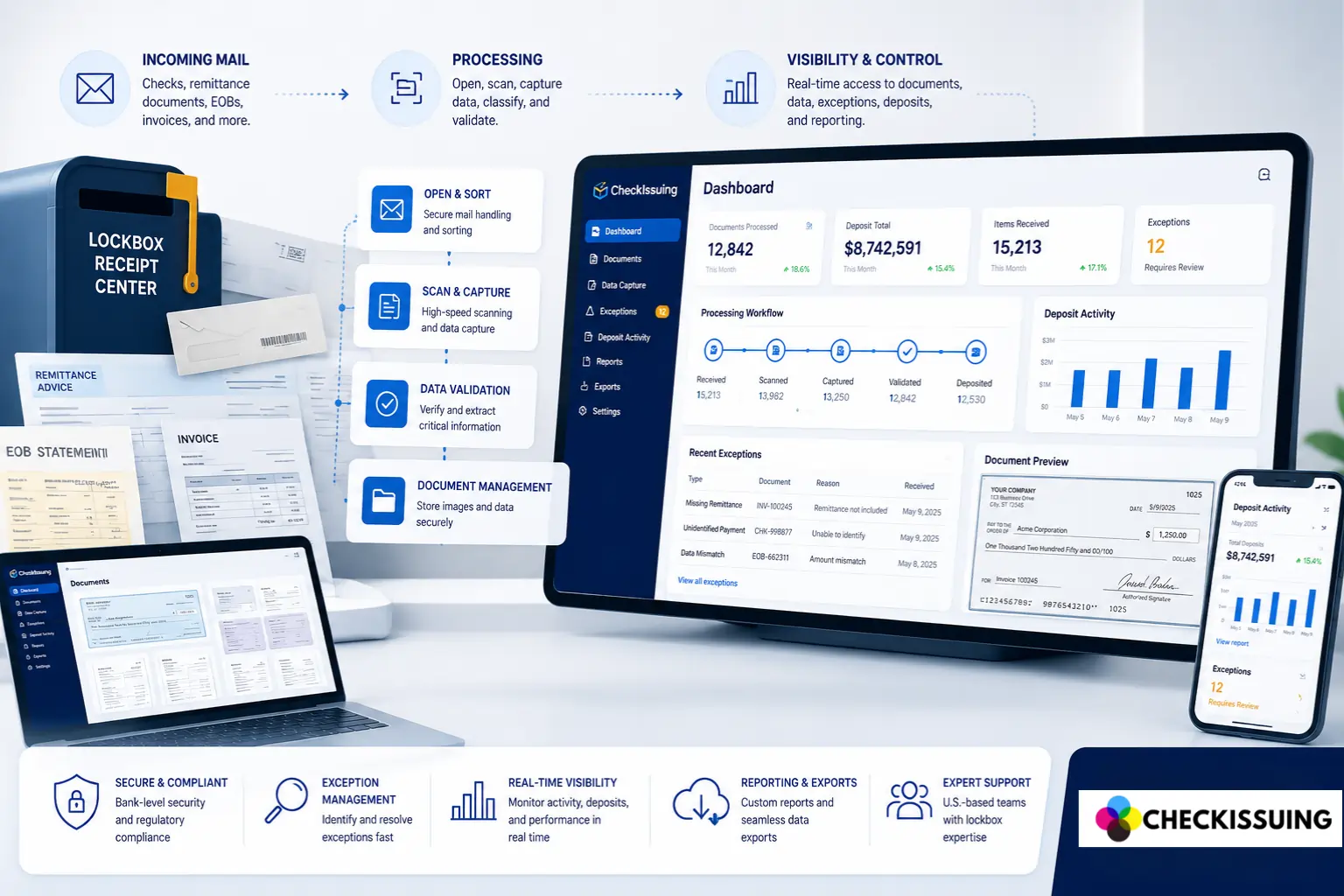
Checks may feel old-fashioned until one lands on your desk with an invoice, remittance stub, EOB, rebate form, claim reference, legal document, or handwritten note attached.
Digital payments are growing, but physical receivables still exist in the real world. For many finance, accounts receivable, healthcare, legal, rebate, property management, claims, and debt service teams, the problem is not just receiving a check. The problem is everything that has to happen after the mail arrives.
Someone has to receive the envelope, open it, sort the contents, scan the check, capture the right details, review exceptions, coordinate deposit activity, and make the information available to the people who need it.
That is where lockbox payment processing can help.
Lockbox payment processing gives businesses a more structured way to handle inbound payment mail. With CheckIssuing Lockbox Services, clients can move mailed checks and related payment documents into a full-service workflow with portal visibility, exception support, deposit coordination, and custom reporting.
Quick Answer Summary
Lockbox payment processing is a service that allows businesses to outsource the receipt, processing, and deposit of mailed payments. Instead of handling incoming checks and payment documents internally, mail is sent to a secure lockbox facility where payments are processed, and reporting is made available. Lockbox services help improve visibility, reduce manual work, and support faster, more organized receivables management.
Key Takeaways
- Lockbox payment processing helps businesses outsource the receipt, scanning, processing, deposit coordination, and reporting of mailed checks and related payment documents.¹
- Full-service lockbox processing means the provider helps handle the operational work, not just the software view.
- Physical mail still matters because many organizations continue to receive checks, remittance documents, EOBs, invoices, claims, rebate forms, coupons, legal documents, and other payment-related mail.¹³
- Portal visibility helps finance and operations teams track received documents, scanned images, captured data, exceptions, deposit activity, reports, and exports.
- CheckIssuing is positioned as an outsourced payment operations partner for businesses that need a structured lockbox workflow with visibility, exception support, deposit coordination, and custom reporting.²
What Is a Lockbox?
A lockbox is a designated payment mail address used to receive checks and payment-related documents on behalf of a business.
In a basic bank lockbox model, payments are mailed to a P.O. box or lockbox address, collected, processed, deposited, and reported back to the business.
In a full-service outsourced lockbox model, the workflow can go further. The provider may support inbound mail handling, document scanning, payment detail capture, exception review, deposit coordination, portal access, and custom reporting built around the client workflow.
That distinction matters. A lockbox is not just a mailbox. When structured well, it becomes an operational workflow for managing physical receivables in a digital business environment.
Why Physical Mail Still Matters
It is easy to assume that payment mail is going away. In practice, many businesses are still operating in a mixed environment. Some customers pay digitally. Others still mail checks. Some payments arrive with documents that need to be reviewed before the payment can be posted, deposited, matched, or reported.
Physical mail still matters because many payment workflows depend on documents beyond the check itself. A payment may arrive with:
- Remittance stubs
- Invoices
- Statements
- Coupons
- Rebate forms
- Claims paperwork
- EOBs
- Legal documents
- Bankruptcy references
- Property or tenant references
- Case, account, customer, patient, or debtor details
When those documents are handled internally, the process can become scattered. Mail sits on desks. Scans are stored in different folders. Payment details are keyed into spreadsheets. Exceptions are handled over email. Deposit questions require someone to chase down status.
A lockbox process helps organize that work into a clearer, more repeatable workflow.
What Full-Service Lockbox Processing Means
Full-service lockbox processing means the provider is doing more than giving the client a portal or a place to upload documents. The provider is helping handle the physical payment workflow itself.
For CheckIssuing, that means the lockbox service can support:
- Receiving inbound payment mail
- Opening and sorting envelopes
- Scanning checks and related payment documents
- Capturing key payment and document details
- Flagging exceptions for review
- Routing items based on the agreed workflow when needed
- Coordinating deposits based on the banking setup, cutoff times, review needs, and deposit cadence
- Making scanned items, statuses, deposit activity, and reports available through the client portal
- Supporting custom reports and exports based on the fields the client needs
This is the core difference between a basic digital tool and a full-service lockbox workflow. Software can help show information, but someone still has to do the physical intake, scanning, review support, deposit coordination, and reporting work. CheckIssuing is positioned to help with that operational layer.
How Lockbox Payment Processing Works
Every lockbox setup depends on the client’s volume, banking setup, document types, review requirements, reporting needs, and deposit cadence. A typical full-service workflow follows these steps.
1. Payment mail is received
Customers, payers, tenants, patients, debtors, rebate participants, claims parties, or other senders mail checks and related documents to the designated lockbox address.
2. Envelopes are opened and sorted
The mail is opened and sorted so checks, remittance documents, invoices, coupons, EOBs, claims, legal paperwork, rebate documents, and other supporting items can be identified and handled according to the workflow.
3. Checks and documents are scanned
Checks and related documents are scanned so the client team has a digital record of what was received. This helps reduce dependency on physical mail routing and gives finance or operations teams a clearer way to review items.
4. Key details are captured
Relevant payment and document details are captured based on the agreed reporting requirements. Fields may include payer, debtor, customer, invoice number, case number, claim number, property, entity, department, check number, check date, amount, deposit batch, status, or exception reason.
5. Exceptions are reviewed
An exception is an item that needs additional review before it can move forward. This may include missing information, mismatched amounts, unclear documents, duplicate references, approval requirements, or items that need client input.
6. Deposits are coordinated
Checks ready for deposit are coordinated based on the agreed workflow, banking setup, cutoff times, review requirements, and deposit cadence. Same-day deposit coordination may be available depending on mail receipt timing, document complexity, exception review, and the agreed client workflow.
7. Reports are made available
Reports and exports can be made available so the client can see what came in, what was reviewed, what needs attention, what was included in a deposit batch, and what data is available for posting or reconciliation support.
Where Portal Visibility Fits In
Portal visibility is one of the most important parts of a modern lockbox process.
A finance team does not only need to know that a check was deposited. The team often needs to know what arrived, when it arrived, what was scanned, which items need review, which payments are connected to which documents, what deposit activity occurred, and what report can be downloaded.
CheckIssuing’s client portal can give teams visibility into:
- Received documents
- Scanned images
- Captured payment data
- Exception status
- Approvals when applicable
- Deposit activity
- Downloadable reports
- Exportable data
This is helpful for teams that are tired of asking questions like: Did the mail arrive? Who scanned it? Is there an exception? Was the check included in a deposit batch? Where is the report?
With a portal-backed lockbox workflow, the client has a clearer place to check status instead of relying on scattered email updates, spreadsheets, and manual follow-up.
Lockbox Processing Is Not Only About Checks
Checks are often the starting point, but many lockbox workflows are really about checks plus documents.
That is especially true for industries where the payment cannot be understood without the supporting paperwork. A healthcare payment may arrive with an EOB. A rebate payment may be tied to a claim form or coupon. A legal payment may include a case reference. A property payment may need to be tied to a tenant, property, entity, or department. A debt service payment may need to be tracked by debtor, trustee, case, or account.
CheckIssuing’s lockbox service can support inbound checks and related payment documents such as remittance documents, invoices, statements, rebate documents, healthcare payment documents, EOBs, legal documents, bankruptcy references, claims paperwork, coupons, and other payment-related mail.
That broader document handling is important because finance teams need usable data, not just scanned checks.
How Custom Reporting Helps Finance Teams
Generic reports are often not enough. A business may need to see payments by entity, department, property, debtor, case number, claim number, invoice, payer, deposit batch, exception status, or date range.
Custom reporting helps turn inbound payment mail into information the team can actually use. Instead of rebuilding spreadsheets manually, the lockbox report can be structured around the fields that matter to the client workflow.
Examples of report fields may include:
- Received date
- Client, entity, department, or account
- Document type
- Payer, debtor, customer, patient, or tenant
- Invoice number, case number, claim number, or reference number
- Check number, check date, and amount
- Deposit batch and deposit date
- Status and exception status
- Reconciliation support fields based on the agreed workflow
This is one of the reasons full-service lockbox processing can be valuable for teams that need more than a standard deposit record.
When In-Office Processing Still Works
Handling checks internally can still work for some organizations. If payment volume is low, documents are simple, and one person can easily receive, scan, deposit, and report on payments, an internal process may be enough.
The challenge starts when volume grows, document types vary, multiple people need visibility, exceptions become more common, or the team needs better reporting.
Internal processing can become difficult when:
- Mail is routed through too many hands
- Checks sit unprocessed while staff are busy or out of office
- Payment documents are scanned into different folders
- Exceptions are handled in email threads
- Finance has to chase operations for the deposit status
- Reports are rebuilt manually from spreadsheets
- Multiple entities, departments, or accounts need different handling
If any of those issues sound familiar, outsourced lockbox processing may be worth reviewing.
Bank Lockbox vs Outsourced Lockbox Provider
Banks offer lockbox services, and for some businesses, a bank lockbox may be the right fit. Bank lockbox services are often connected to treasury management, deposit accounts, and standardized remittance processing.
An outsourced lockbox provider may be a better fit when the business needs more flexibility around documents, exception handling, portal visibility, custom report fields, multi-entity workflows, specialty payment documents, or operational support beyond a standard bank template.
CheckIssuing should be understood as an outsourced payment operations partner, not a bank. The service is designed for businesses that need help managing inbound payment mail, scanned documents, exceptions, deposits, and reporting in a structured workflow.
What Finance Teams Get Out of Lockbox Processing
A good lockbox workflow gives finance and operations teams a clearer way to manage mailed payments. Instead of treating incoming checks as a manual side task, the process becomes more structured, visible, and reportable.
That can help teams:
- Reduce manual mail handling
- Improve visibility into incoming payment mail
- Track exceptions more clearly
- Connect checks with supporting documents
- Coordinate deposits based on the agreed workflow
- Download reports and exports
- Support reconciliation with cleaner payment data
- Reduce back-and-forth between finance, operations, and client-facing teams
The goal is not to make physical mail disappear. The goal is to make physical receivables easier to manage in a digital workflow.
A Better Way to Manage Physical Receivables
Payment technology keeps moving forward, but physical receivables still show up in many business workflows. Checks, remittance stubs, forms, claims, EOBs, coupons, invoices, and legal documents still need a process.
Lockbox payment processing helps businesses move that work out of scattered internal handling and into a structured workflow. With CheckIssuing, that workflow can include full-service processing, portal visibility, exception review, deposit coordination, and custom reporting built around the client’s actual needs.
If your team is still opening payment mail, scanning checks, chasing exceptions, preparing deposits, or rebuilding reports manually, CheckIssuing Lockbox Services can help make the process easier to track.
Learn more about CheckIssuing Lockbox Services or request a custom quote based on your volume, document types, deposit needs, and reporting requirements. You can also call us directly or set up a meeting with our experts for a more in-depth demo.
Lockbox Payment Processing FAQs
What is lockbox payment processing?
Lockbox payment processing is an outsourced workflow for receiving, scanning, processing, deposit coordination, and reporting of mailed check payments and related payment documents.
What is full-service lockbox processing?
Full-service lockbox processing means the provider supports the operational workflow, including mail receipt, opening and sorting, scanning, detail capture, exception review, deposit coordination, portal visibility, and reporting.
Can lockbox services process documents beyond checks?
Yes. Depending on the workflow, lockbox services can include checks plus remittance documents, invoices, statements, coupons, rebate forms, claims paperwork, EOBs, legal documents, bankruptcy references, and other payment-related documents.
Can clients view lockbox documents online?
With CheckIssuing, the client portal can provide visibility into received documents, scanned images, captured payment data, exception status, approvals when applicable, deposit activity, downloadable reports, and exportable data.
How are lockbox exceptions handled?
Exceptions are items that need additional review before moving forward. Examples include missing information, mismatched amounts, unclear documents, duplicate references, or items requiring client approval.
Are same-day lockbox deposits guaranteed?
No. Same-day deposit coordination may be available depending on mail receipt timing, document complexity, exception review, banking setup, cutoff times, and the agreed workflow.
Is CheckIssuing a bank?
No. CheckIssuing is not a bank. CheckIssuing provides outsourced payment operations, including lockbox processing, deposit coordination, check mailing, digital checks, ACH, rebate processing, 1099 services, and document mailing.
How are lockbox reports customized?
Reports and exports can be configured around the fields the client needs, such as entity, department, payer, debtor, invoice, case, claim, property, amount, deposit batch, status, exception status, and date range.
Footnotes / Citations
- Federal Reserve Financial Services – Business Payments Study
https://fedpaymentsimprovement.org/wp-content/uploads/business-payments-report.pdf - Association for Financial Professionals (AFP) – Digital Payments Survey
https://www.financialprofessionals.org/training-resources/resources/survey-research-economic-data/Details/digitalpayments - United States Postal Service (USPS) – Service Standards Update
https://about.usps.com/newsroom/national-releases/2025/0320-usps-is-enhancing-service-standards.htm
Last updated: June 4, 2026