
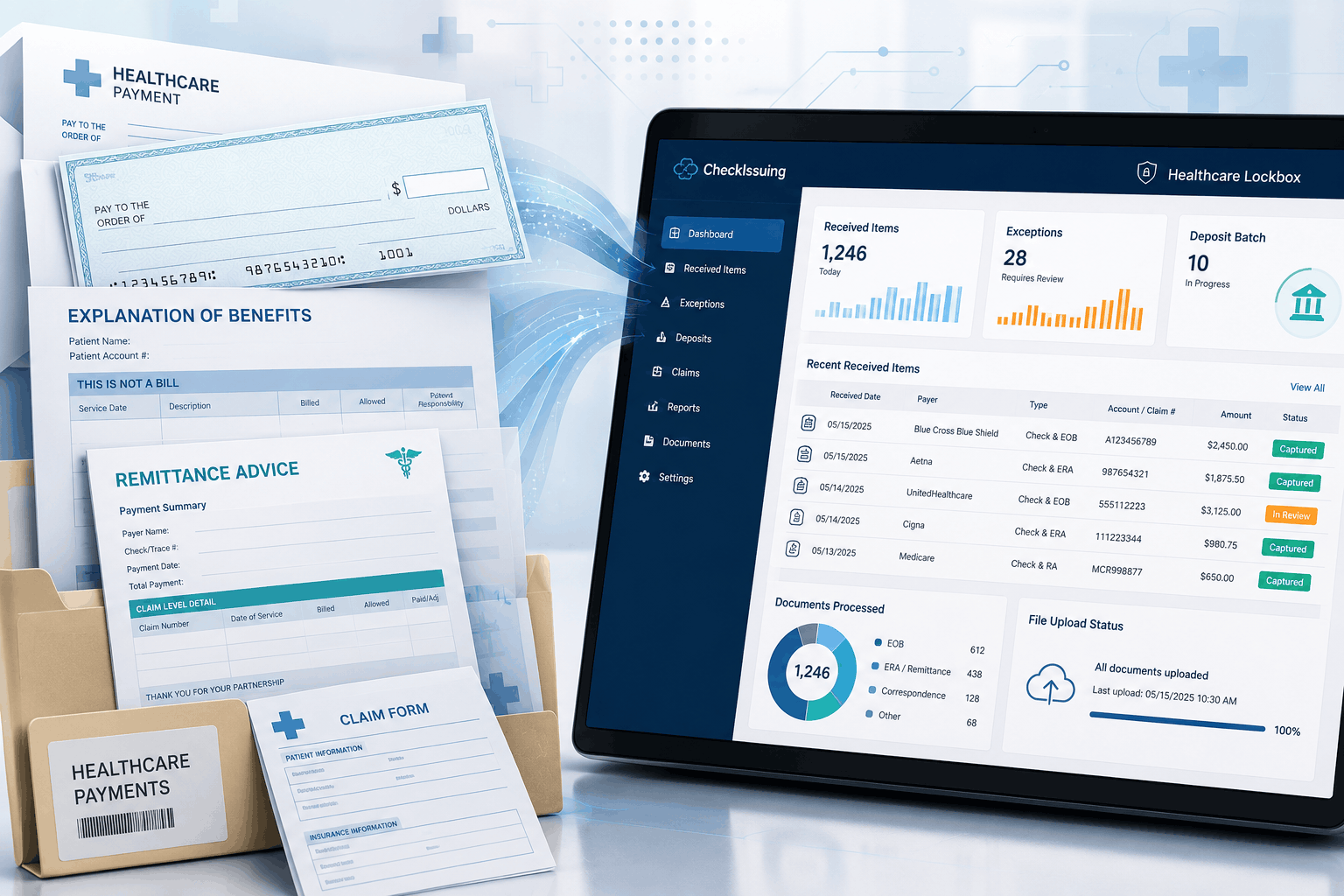
A healthcare payment envelope rarely holds just a check. More often, it carries an explanation of benefits, a remittance note, a claim number scrawled in the corner, or a patient account reference that only makes sense to whoever opens the mail that morning. The check tells you money arrived. It doesn’t tell you where it belongs.
That gap between a deposit and the information needed to post it is exactly why healthcare lockbox processing is important in a billing team’s workflow, and it’s worth understanding what that involves before assuming every lockbox works the same way.
Quick Answer Summary
Healthcare lockbox processing helps providers organize incoming checks, remittance advice, EOBs, and payment documents by centralizing mail receipt, scanning supporting documents, routing exceptions, coordinating deposits, and providing reporting through a secure portal. This helps billing teams improve reconciliation while maintaining better visibility into payment workflows.¹²³
Key Takeaways
- Healthcare payments often include checks, EOBs, remittance advice, claims documentation, and supporting paperwork that must remain connected throughout processing.¹
- Healthcare lockbox services centralize mail intake, scanning, document capture, exception routing, deposit coordination, and reporting.
- Organizing payment documents alongside checks improves reconciliation and reduces manual research during accounts receivable workflows.
- Exception tracking provides visibility into missing documentation, mismatched references, and items requiring manual review.
- Healthcare organizations should evaluate document handling, access controls, retention policies, and business associate responsibilities when selecting a lockbox provider.³
- CheckIssuing combines full-service healthcare lockbox processing with check printing, ACH, digital checks, document mailing, and related payment solutions.
Why Healthcare Payment Mail Needs More Than Check Processing
Healthcare Lockbox Documents at a Glance
| Document | Primary Purpose | Who Typically Uses It |
|---|---|---|
| Explanation of Benefits (EOB) | Explains how an insurance claim was processed and what the patient may owe. | Patients, providers, and billing staff. |
| Remittance Advice (RA) | Explains how a payer processed and paid a healthcare claim. | Healthcare providers, finance teams, and billing departments. |
| Electronic Remittance Advice (ERA) | Provides a digital version of remittance advice that can support automated posting and reconciliation. | Healthcare providers, billing systems, and revenue cycle teams. |
| Patient Payment | Represents a payment received directly from a patient for services, balances, or cost-sharing amounts. | Provider billing departments and accounts receivable teams. |
| Claim Documents | Provide supporting information needed for claim review, payment application, and reconciliation. | Billing, claims, finance, and revenue cycle teams. |
Open ten envelopes from ten different payers, and you’ll likely get ten different combinations of paperwork. A check might arrive with an EOB. It might arrive with a remittance advice instead, a different document doing a different job.
- An EOB typically explains costs and coverage to the patient or plan member.
- A remittance advice explains how a payer processed a claim, which is what providers use to post payments.
- An electronic remittance advice (ERA) is the digital version of that same document.
Conflating the two causes real confusion downstream, so it’s worth holding the distinction, even in casual conversation about the process. And despite the steady move toward digital claims, paper hasn’t left the picture. J.P. Morgan’s 2025 healthcare payments research found that 68% of surveyed payers still reimbursed providers by paper check, up from 60% in 2023, even as Nacha reported nearly 548 million healthcare claim payments moving through the ACH Network that same year.
Both things are true at once. Most healthcare organizations are running mixed-payment environments, not fully electronic ones, and medical lockbox services exist for exactly that overlap.
What Healthcare Lockbox Processing Services Look Like
At its core, this is a structured way of handling everything that arrives in that envelope, not just the check inside it.
- Mail is received at an agreed lockbox address, rather than scattered across offices or individual staff desks.
- Items are opened and sorted, such as insurance payments, patient payments, EOBs, correspondence, and items needing manual review.
- Checks and supporting documents are scanned together, so the record stays connected.
- Relevant references are captured, including payer, account, claim number, check amount, and date received.
- Items are routed to the right team based on what they are and what they need.
CheckIssuing handles that full sequence directly, from the mail, the scanning, the uploads, to the routing, rather than handing a client software and asking them to do the work themselves. Our lockbox services sit alongside related pieces of the payment picture, including check printing and document mailing, so the physical side of the process doesn’t become its own separate headache.
Manual Healthcare Mail vs. Healthcare Lockbox Processing
| Manual Healthcare Mail Handling | Healthcare Lockbox Processing |
|---|---|
| Mail may be delivered to multiple offices, departments, or staff members. | Incoming payment mail is directed to a centralized lockbox address. |
| Opening and sorting depend on internal staff availability. | Mail is received, opened, and sorted through a structured intake workflow. |
| Checks and supporting documents may be scanned or stored separately. | Checks, EOBs, remittance advice, and related documents remain connected within the workflow. |
| Payment status may be tracked through email, spreadsheets, or shared folders. | Portal visibility can show received items, scanned images, exceptions, deposits, and reports. |
| Exceptions may sit in inboxes without clear ownership or status. | Exceptions are flagged, documented, and routed according to the agreed review process. |
| Reconciliation often requires manual research across several systems. | Captured payment data and supporting documents help teams reconcile more efficiently. |
| Maintaining a complete audit trail can be difficult. | Centralized document history, status tracking, and reporting create a clearer processing record. |
Creating Visibility Into Exceptions and Missing Information
Exceptions are simply part of healthcare mail. A lockbox doesn’t make them disappear, and it shouldn’t claim to.
- A check with no account or patient reference attached
- An account number that doesn’t match internal records
- One check covering several claims or facilities
- A document that arrives without its check, or a check without its document
What changes is whether those items get lost in a shared inbox or get flagged, documented, and routed somewhere specific. Through the portal, a billing team can see what’s been received, what’s been scanned, what’s sitting in review, and why, which is a meaningfully different experience than reconstructing that story from a mail tray, a bank portal, and three separate spreadsheets.
Supporting Reconciliation and Reporting
Organized intake doesn’t post payments automatically, and it shouldn’t be sold that way. What it can do is give a team the pieces they need to reconcile with confidence: scanned documents lined up against captured amounts, deposit batches, and bank activity, so someone can answer whether a check was deposited in full or whether a supporting document is still missing.
Lockbox processing services that support this kind of work tend to be built around custom reporting, because healthcare organizations don’t all reconcile the same way. A hospital system juggling several facilities may need reports broken out by location and payer. A smaller specialty group may care more about account-level detail.
Either way, lockbox payment processing services should bend to match how the organization already works, not the reverse, and that reporting layer connects naturally to related tools like ACH and digital check processing, where the same need for entity- and claim-level clarity shows up again.
Handling Sensitive Healthcare Documents Responsibly
Checks and their accompanying paperwork can carry patient names, claim numbers, treatment details, and other information that may qualify as protected health information, depending on the parties and context involved.
The HHS Privacy Rule calls for reasonable safeguards around that kind of information, whether it’s sitting on paper or scanned into a system, and when documents become electronic PHI, the Security Rule’s safeguard requirements can come into play as well. A vendor that opens, scans, and routes those documents on a covered entity’s behalf may be acting as a business associate, which is a conversation worth having directly, including whether a BAA is needed and how retention and access controls are handled.
None of this means a lockbox provider can promise blanket HIPAA compliance. HHS doesn’t certify vendors that way, and any service that claims otherwise is overstating what’s true. What a responsible provider can offer is controlled handling, defined access, and a workflow built with those safeguards in mind.
Let’s Build a Lockbox Workflow That Fits Your Team
None of this is about replacing judgment with software. It’s about giving billing and finance teams a clearer starting point; mail that’s centralized, documents that stay connected to their checks, exceptions that surface instead of hide, and reporting that reflects how the organization operates.
That’s the work we handle in full at CheckIssuing: the mail, the scanning, the exception routing, the deposit coordination, and the reporting, with the portal keeping your team informed at every step. It also connects naturally to the other payment work we handle, from check printing and ACH to email checks and 1099s. If your team is still piecing together what happened to a payment after it’s already been deposited, contact us, call us, or schedule a meeting with our experts, and we’ll talk through what a healthcare lockbox processing services workflow could look like for your organization.
Citations
- J.P. Morgan – 2025 Healthcare Payments Trends Report – https://www.jpmorgan.com/payments/newsroom/healthcare-payments-trends-report-2025
- Nacha – EFT Healthcare Claim Payments Continue to Rise – https://www.nacha.org/news/eft-healthcare-claim-payments-continue-rise-2025
- U.S. Department of Health & Human Services – HIPAA De-Identification Guidance – https://www.hhs.gov/hipaa/for-professionals/special-topics/de-identification/index.html
- Centers for Medicare & Medicaid Services – Electronic Remittance Advice (ERA) – https://www.cms.gov/medicare/coding-billing/electronic-billing/health-care-payment-remittance-advice
- HHS – HIPAA for Professionals – https://www.hhs.gov/hipaa/for-professionals/index.html