
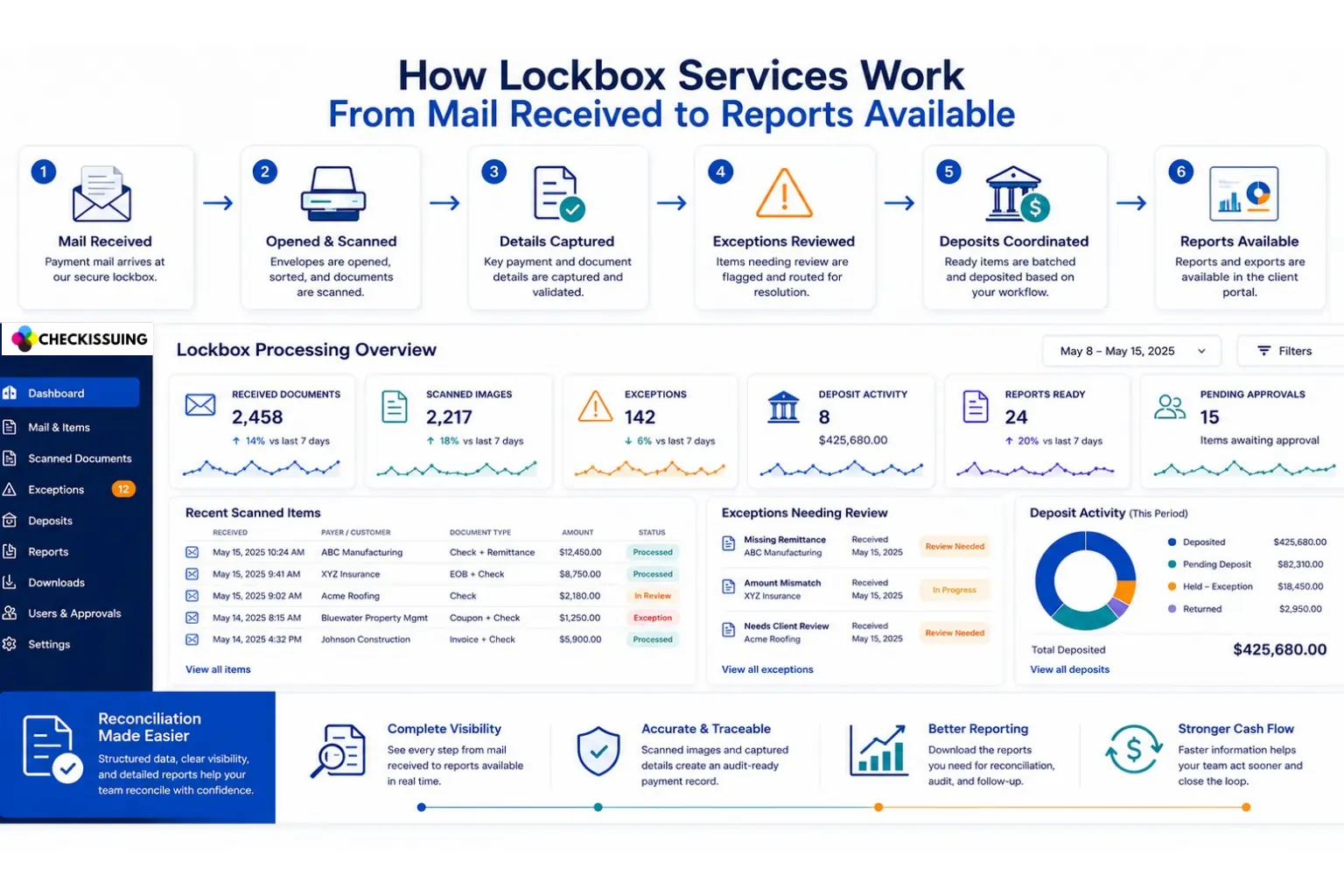
Lockbox services sound simple from the outside. A customer mails a check, a provider receives it, and the payment gets processed.
But for finance, accounts receivable, rebate, legal, healthcare, property, claims, and operations teams, the real value is in what happens between those steps.
Who received the mail? Was the check scanned? Was the payment matched to the right account, case, claim, invoice, debtor, property, or customer? Is there an exception? Was the deposit coordinated? Can the team download a report without chasing someone for an update?
A strong lockbox service turns inbound payment mail into a structured workflow. At CheckIssuing, that workflow is supported by full service processing and portal visibility, so your team can see what came in, what needs review, what was deposited, and what reporting is available.
Quick Answer Summary
Lockbox services work by moving mailed checks and related payment documents into a managed workflow. A provider receives the mail, opens and sorts items, scans checks and documents, captures key details, supports exception review, coordinates deposits based on the agreed process, and makes reports available through a client portal. This gives finance teams a clearer way to track incoming payments without handling every step manually.
Key Takeaways
- Lockbox services help businesses move mailed checks and payment documents into a structured workflow for intake, scanning, review, deposit coordination, and reporting.¹²
- Full-service lockbox processing supports the operational work behind the portal, not just document viewing.
- Many businesses still manage mixed payment environments, including checks, ACH, cards, and other payment channels.¹²
- Portal visibility helps teams review scanned documents, captured data, exceptions, approvals, deposit activity, and downloadable reports.
- Exception review is a key part of lockbox processing because unclear, missing, or mismatched payment details often need review before moving forward.
- Deposit timing should be based on mail receipt timing, document complexity, exception review, banking setup, and the agreed workflow.³
Why Businesses Use Lockbox Services
Many businesses now operate in mixed-payment environments where checks, ACH payments, cards, and other payment methods coexist. According to the Federal Reserve’s 2024 Business Payments Study, businesses continue to use a variety of payment channels, creating ongoing demand for structured payment intake and reconciliation workflows.
The problem is not only the check. The problem is the workflow around the check.
Internal teams often need to answer basic questions every day. What arrived? Who opened it? What was scanned? What account does it belong to? Is anything missing? Was the payment ready for deposit? Was it included in a deposit batch? What report should accounting use for reconciliation?
When those answers live in mail piles, inboxes, spreadsheets, or one person’s memory, the process becomes hard to manage. Lockbox services help move that work into a repeatable process with clearer visibility.
Step 1: Mail Received
The workflow starts when your customers, payers, clients, tenants, patients, trustees, or other payment senders mail checks and related documents to the lockbox address set up for your workflow.
This may support a simple single entity process, or it may be configured for multiple departments, entities, accounts, document types, or reporting needs depending on the agreed setup.
Once mail is received, it enters the lockbox process instead of sitting with your internal team. This reduces the need for staff to physically collect, open, and track payment mail every day.
Step 2: Opened and Sorted
After the mail is received, envelopes are opened and the contents are sorted. Checks may be separated from payment stubs, coupons, invoices, forms, rebate claims,
EOBs, case documents, or other supporting paperwork.
This step matters because every workflow is different. A simple payment may only require the check and a payer name. A rebate, healthcare, legal, property, claims, or bankruptcy workflow may require supporting documents and reference fields to stay connected to the payment record.
A structured lockbox process helps keep the physical mail, scanned images, captured fields, exception review, deposit activity, and reporting connected from the start.
Step 3: Scanned and Imaged
Next, checks and related documents are scanned to create a digital record of what was received. This gives your team visibility without requiring them to handle the physical mail.
Scanned images can help finance, accounting, operations, legal, healthcare, rebate, claims, property, and debt service teams review supporting documents, validate information, resolve exceptions, and confirm what was received.
With CheckIssuing, scanned documents can be made available through the client portal based on the client workflow, access needs, and agreed requirements.
Step 4: Details Captured
After scanning, key payment and document details are captured. The fields depend on the workflow.
For a straightforward accounts receivable workflow, captured fields may include payer name, check number, check date, payment amount, invoice number, and account number.
For a more specialized workflow, fields may include case number, claim number, debtor name, property reference, patient account reference, EOB reference, department, entity, deposit batch, exception status, or other client specific fields agreed during setup.
This is where lockbox processing becomes more valuable than basic mail scanning. The goal is not only to digitize documents. The goal is to make the payment information easier to review, route, deposit, report, and reconcile.
Step 5: Validation and Exception Review
Not every item can move directly from scan to deposit. Some payments need review before they can move forward.
An exception may happen when a check arrives without a payment stub, the amount does not match the expected invoice or claim, a document is unclear, a reference number is missing, or the payment needs client approval before deposit.
Exceptions can be flagged in the portal with the scanned image, captured data, and reason for review. Depending on the agreed workflow, the item may be held for review, routed to a designated contact, approved, corrected, returned, or escalated.
This is one of the most important parts of a full service lockbox workflow. The client should not have to wonder why a payment is stuck or where it is in the process.
Step 6: Deposits Coordinated
Once an item is ready, deposits are coordinated based on the agreed workflow, banking setup, cutoff timing, exception review process, and deposit cadence.
Some workflows may be straightforward. Others may require review by entity, department, account, approval path, document type, or client specific routing rule before deposit activity can move forward.
Same day deposit coordination may be available depending on mail receipt timing, document complexity, exception review, banking setup, and the agreed client workflow. The final process should be confirmed during quoting and onboarding so expectations are clear before the workflow goes live.
Step 7: Reports Available
The final step is reporting. Once items are processed, your team needs a clear way to see what happened.
A strong lockbox report should do more than summarize deposit totals. It should help your team understand what was received, what was scanned, what was deposited, what needs attention, and which records need to be reviewed or reconciled.
CheckIssuing can configure reports and exports around the fields that matter to the client. Examples may include received date, processed date, entity, department, payer, debtor, invoice number, case number, claim number, property reference, check number, check date, payment amount, deposit batch, deposit date, status, exception status, exception reason, and other agreed fields.
Reports and exports can be made available in common formats such as CSV, Excel, or PDF, with additional delivery options reviewed during setup based on the client workflow and reporting needs.
Where the Portal Fits Into the Lockbox Workflow
A lockbox portal is not the same thing as the lockbox service itself. The portal gives visibility into the work happening behind the scenes.
With CheckIssuing, the client portal helps teams view received documents, scanned images, captured payment data, validation details, exceptions, approvals when applicable, deposit activity, downloadable reports, and exportable data.
This matters because a finance or operations team should not have to rely on manual follow up to know what came in or what still needs action. The portal helps turn the lockbox workflow into something visible and trackable.
What Types of Documents Can Be Part of a Lockbox Workflow?
Lockbox processing is often associated with checks, but many real business workflows include checks plus supporting documents.
Depending on the agreed setup, a lockbox workflow may include business checks, personal checks, money orders when supported, payment stubs, remittance documents, invoices, statements, payment coupons, account references, rebate claim submissions, healthcare payment documents, insurance checks, EOBs, legal settlement documents, trust related payments, property payment references, claims paperwork, bankruptcy payment references, and other payment related documents.
The important point is that the workflow should match the documents your team actually receives. During quoting and onboarding, CheckIssuing can help define the document types, routing rules, validation steps, deposit requirements, report fields, and portal access needs for the workflow.
What Makes a Full Service Lockbox Workflow Different?
Some tools only help you view documents or track status. A full service lockbox workflow goes further because the provider handles the operational work.
CheckIssuing receives inbound mail, opens and sorts items, scans checks and documents, captures key details, supports exception review, coordinates deposits based on the agreed workflow, and makes reports available. The portal gives your team visibility into that work.
That distinction matters. Your team is not just buying software. Your team is outsourcing a repeatable payment operations process.
Who Benefits From This Type of Workflow?
Lockbox services can help teams that receive mailed checks and payment documents and need a clearer way to process, track, and report on them.
Common use cases include finance and accounts receivable teams, rebate administrators, healthcare billing teams, legal administrators, property management companies, claims teams, bankruptcy and debt service teams, and enterprise operations teams managing inbound payment mail across departments or entities.
If your team is spending time opening mail, scanning checks, entering payment details, chasing missing information, preparing deposits, or building reports manually, a lockbox workflow may be worth evaluating.
What to Confirm Before Setting Up Lockbox Services
The right lockbox setup depends on the details of your workflow. Before requesting a quote, it helps to understand your approximate mail volume, check volume, document types, number of entities or accounts, deposit cadence, exception handling needs, approval paths, reporting fields, portal access needs, and any export or delivery format requirements.
You do not need to have every answer before talking with CheckIssuing. The quoting and onboarding process can help define the workflow, but the more detail you can provide, the easier it is to build the right setup.
Lockbox Workflow Table
| Workflow Stage | What Happens | What the Client Can Track |
|---|---|---|
| Mail Received | Inbound checks and payment documents arrive at the lockbox address. | Receipt status and item intake based on the workflow. |
| Opened and Sorted | Envelopes are opened and items are separated by document type or workflow rule. | What arrived and how items are categorized. |
| Scanned and Imaged | Checks and related documents are scanned to create a digital record. | Scanned images and document status. |
| Details Captured | Key payment and document fields are captured based on the setup. | Payer, amount, check details, case, claim, invoice, entity, department, or other agreed fields. |
| Exceptions Reviewed | Items needing review are flagged and routed based on the agreed process. | Exception reason, review status, approval status, and items needing action. |
| Deposits Coordinated | Ready items are prepared and deposited based on the agreed workflow and banking setup. | Deposit activity, deposit batch, deposit date, and status where applicable. |
| Reports Available | Reports and exports are made available for review, reconciliation, and audit support. | Downloadable reports and exportable data. |
Final Takeaway
Lockbox services work best when they do more than collect checks. The real value is the full workflow from mail received to reports available.
CheckIssuing helps businesses move inbound checks and related payment documents into a structured process with mail receipt, opening and sorting, scanning, detail capture, exception review, deposit coordination, portal visibility, and custom reporting.
Your team gets a clearer way to see what came in, what needs attention, what was deposited, and what reporting is ready to use.
Ready to make inbound payment processing easier to track? Request a custom lockbox quote, call us directly, or schedule a demo with CheckIssuing.
Do LockBox Services Work FAQs
What are lockbox services?
Lockbox services help businesses outsource the receipt, scanning, processing, deposit coordination, and reporting of mailed check payments and related payment documents.
How do lockbox services work?
Mail is received at a lockbox address, opened and sorted, scanned, reviewed, processed for deposit coordination, and reported back to the client through a portal or data delivery process.
Can clients view scanned lockbox documents online?
Yes. CheckIssuing clients can view scanned documents, captured data, exceptions, deposit activity, and downloadable reports through the client portal based on the agreed workflow.
What is an exception in lockbox processing?
An exception is an item that needs additional review before it can move forward. Examples include missing details, unclear documents, mismatched amounts, or payments requiring client approval.
Can lockbox reports be customized?
Yes. CheckIssuing can configure reports and exports around fields such as entity, department, payer, invoice, case, claim, property, check number, amount, deposit batch, status, and exception reason.
Does CheckIssuing guarantee same day deposits?
No guarantee should be stated publicly. Same day deposit coordination may be available depending on mail receipt timing, document complexity, exception review, banking setup, and the agreed workflow.
Citations
- Federal Reserve Financial Services – 2024 Business Payments Insights Study
https://fedpaymentsimprovement.org/wp-content/uploads/2024-federal-reserve-payments-insights-business-study.pdf - Association for Financial Professionals – 2025 Digital Payments Survey
https://www.financialprofessionals.org/training-resources/resources/survey-research-economic-data/Details/digitalpayments - USPS – USPS Is Enhancing Service Standards
https://about.usps.com/newsroom/national-releases/2025/0320-usps-is-enhancing-service-standards.htm