
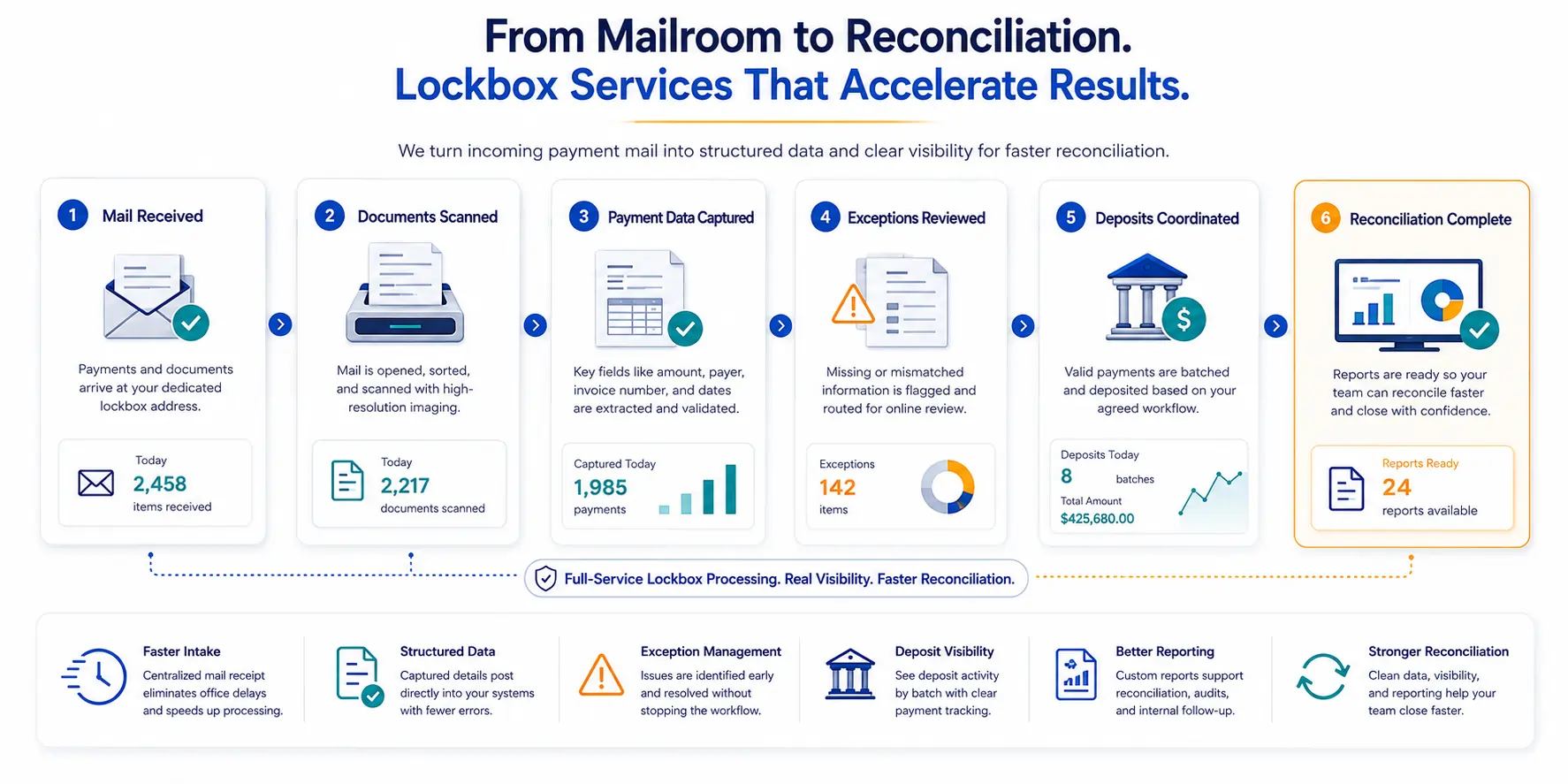
Most reconciliation delays start earlier than people expect. They begin before anyone opens an envelope or reads a remittance slip, while checks sit in trays and payment details wait to be matched by hand. When intake is scattered and manual, payment reconciliation falls behind from the start. This is where lockbox services help.
Full-service processing turns incoming paper payments into structured, traceable data, so finance teams can reconcile faster without chasing every detail across spreadsheets, inboxes, and branch offices.
Quick Answer Summary
Lockbox services help accelerate payment reconciliation by converting incoming checks and remittance documents into structured, searchable payment data. Instead of relying on manual mail handling, spreadsheets, and email follow-up, finance teams gain visibility into received payments, scanned documents, exceptions, deposits, and reporting, making it easier to match payments, resolve discrepancies, and support faster reconciliation workflows.¹²
Key Takeaways
- Lockbox services help finance teams reconcile payments faster by centralizing mail intake, document capture, exception handling, and reporting.¹²
- The biggest reconciliation delays often occur before deposits are made, when payment mail and remittance details are handled manually.¹
- Full-service lockbox processing includes mail receipt, scanning, data capture, deposit coordination, exception review, and reporting—not just check deposits.²
- Structured payment data reduces manual keying, improves payment matching, and supports more efficient accounts receivable workflows.¹²
- Portal visibility gives teams a real-time view of received payments, scanned documents, exceptions, deposits, and available reports.²
- Exception management helps prevent individual payment issues from delaying entire reconciliation batches.²
- CheckIssuing positions lockbox services as an outsourced payment operations workflow, combining operational processing with reporting and visibility tools.
The Real Bottlenecks in Payment Reconciliation
Before a payment can be matched, it must arrive somewhere, get opened, and be tied to the right invoice. Each of those steps is a place where payment reconciliation slows down.
- Payments land at PO boxes, branch offices, and remote desks, with no single intake point.
- Invoice numbers, customer IDs, and case references often arrive handwritten or detached from the check they belong to.
- Manual data entry and email-based exception handling push posting back by days or weeks.
- The strain shows up in accounts receivable, where aging reports drift out of date, and collections chase invoices that were already paid.
It does not help that payments now arrive through mixed channels. According to the Federal Reserve’s 2024 Business Payments Study, businesses keep using older payment methods, even as ACH, cards, and instant payments grow. When some of those records are structured, and others are loose paper, matching them is slow and easy to get wrong.
What Full-Service Lockbox Processing Does (Beyond Deposits)
Depositing a check is the visible part of the job. Most of the work that helps reconciliation happens before and after that deposit. Mail comes in to a dedicated address, where it is opened and sorted item by item, then the checks and the documents that travel with them, such as remittance slips, EOBs, claim forms, and legal correspondence, are scanned. From there, key fields like amount, payer, and invoice number are captured to build searchable payment records, deposits are coordinated on an agreed schedule, and anything unclear is flagged for online review.
Because the same workflow handles more than checks, it can take in remittance forms, claim submissions, escrow documents, and settlement statements, all of which carry the context that a payment needs to be matched correctly. This is the part worth slowing down on.
Lockbox workflows include extraction and scanning, where the provider pulls checks and accompanying documents from envelopes and creates high-resolution images. That is the real distinction in lockbox payment processing: It is not software you log into on your own. A team does the operational work, and you see it happen.
That model sits at the center of full-service lockbox services, where the provider handles intake, and the client keeps a clear view of the work.
How Lockbox Services Accelerate Reconciliation
The effect of lockbox services is clearest in the numbers. In a U.S. Bank lockbox automation case study, payments posted four to seven days faster, and more than 90% of previously manual payments were posted automatically. That kind of gain comes from three shifts, and none of them is a single feature. What lockbox payment processing really changes is the set of manual steps between mail arrival and posted payment.
Faster Intake
Centralized mail processing removes the office-to-office routing and desk-stack delays that hold payments before finance ever sees them. The data is captured earlier, so payment processing can begin sooner.
Structured Data
Scanned images and captured remittance fields post directly into the accounting or accounts receivable system. That cuts manual keying and the errors that tend to follow it.
Exception Handling
Missing invoice numbers and mismatched amounts are routed to an online queue. The team resolves them there without losing the payment trail, so one unclear item does not stall an entire batch.
Portal Visibility Shows the Work Being Done
It helps to be clear about what the portal is. It is not a self-service lockbox you run yourself. It is a transparency layer over work that is already underway.
- What came in and what was scanned
- Which items need review
- What was deposited
- Which reports are ready
That visibility is the point. Rather than calling the mailroom or rebuilding a spreadsheet, a team can check the status of its payment processing and move on. Status sits in one place, so the people who depend on it are not waiting on someone else to check. Seen this way, the portal supports the service instead of standing in for it.
Why Better Reporting Helps Finance Teams Close the Loop
Reconciliation depends on knowing what happened to each payment, not just how much arrived. Reporting is what carries that detail. Deposit reports show what was sent to the bank, when, and in which batch, while exception status reports show which items need attention, why, and where they sit in the review queue. Batch-level visibility ties individual checks and documents back to their deposit groups, and custom reporting can be built around how a team tracks work, whether that is by entity, department, case number, claim, property, payer, or program.
Records like these do quiet but real work. When accounting, AR, and collections all work from the same record, fewer questions turn into back-and-forth. Cleaner detail supports a faster month-end close, smoother audits, and more confident customer follow-up, and it keeps payment reconciliation from turning into a research project every time a question comes up.
Let Us Help You Reconcile Faster With Full-Service Lockbox Processing
Reconciliation delays are not a fixed cost of doing business. They are mostly a symptom of unmanaged intake. When mailed payments and the documents around them become organized, traceable data, the rest of the workflow has something solid to stand on, and reporting closes the loop instead of leaving it open.
That is the work we do at CheckIssuing. We handle the mail, the scanning, the exceptions, the deposits, and the reporting, and our portal gives your team a clear view of all of it, with custom reports shaped around how you already track payments. Because lockbox is one piece of a larger picture, we also connect it with check printing, ACH, email checks, rebates, and 1099 services on one connected platform.
If your team is tired of chasing payment details, we would rather you spend that time reconciling. Contact us, call us directly, or set up a meeting with our experts to talk through your lockbox workflow and request a quote built around it.
Citations
- Federal Reserve Financial Services – 2024 Business Payments Study
Federal Reserve Financial Services. Business Payments Insights Study (2024).
https://fedpaymentsimprovement.org/wp-content/uploads/2024-federal-reserve-payments-insights-business-study.pdf - U.S. Bank – Healthcare Payment Consolidator Lockbox Automation Case Study
U.S. Bank. Healthcare Payment Consolidator Improves Cash Flow Through Lockbox Automation.
https://www.usbank.com/corporate-and-commercial-banking/treasury-payment-solutions/client-stories/healthcare-payment-consolidator.html