
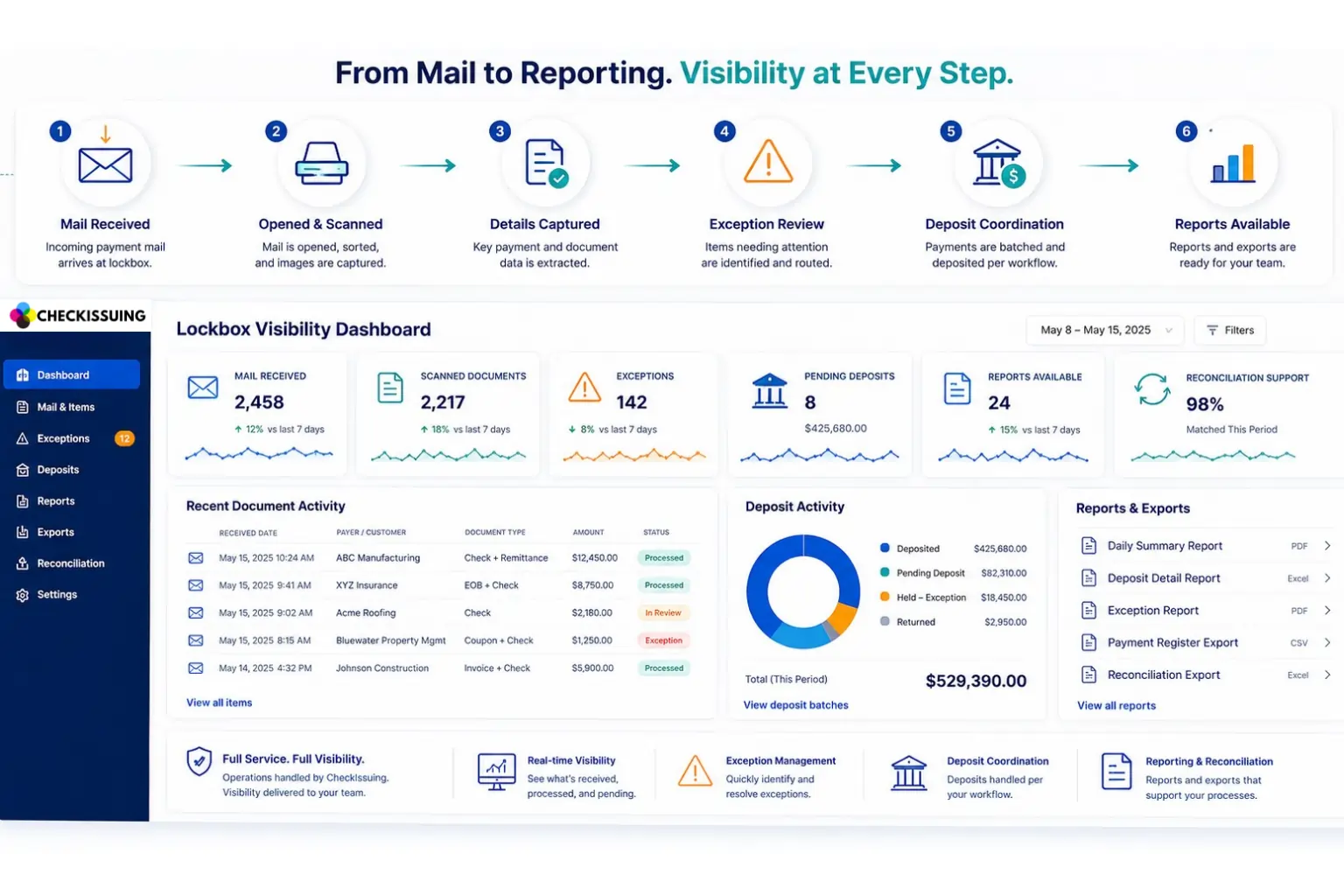
Finance teams do not only need payments to arrive. They need to know what arrived, when it arrived, what it relates to, what still needs review, and what has been included in a deposit or report.
That can be difficult when incoming checks and payment documents move through a manual office workflow. Mail may sit in a tray. Checks may be scanned by one person and reported by another. Supporting documents may need separate review. Exceptions may live in email threads or spreadsheets. Even when the payment is received, the team may not have a clear view of where it stands.
This is where lockbox visibility matters. A full service lockbox workflow helps finance teams move incoming payment mail into a more structured process. The provider receives the mail, opens and scans items, captures key details, supports exception review, coordinates deposits based on the agreed workflow, and makes reports available.
At CheckIssuing, the portal is not the whole service. The portal gives visibility into the work being done behind the scenes. For finance teams, that means a clearer way to track incoming payments from receipt through reporting without relying on scattered manual updates.
Quick Answer Summary
Lockbox visibility helps finance teams track incoming payments by providing visibility into received mail, scanned documents, captured payment details, exceptions, deposit activity, and reporting. Instead of relying on manual updates or disconnected spreadsheets, teams can use a structured lockbox workflow to monitor payment activity from receipt through reconciliation.
Key Takeaways
- Lockbox visibility helps finance teams track what payment mail has been received, scanned, reviewed, deposited, and reported.¹
- Full-service lockbox processing combines operational support with portal visibility, rather than providing software access alone.
- Physical mail remains important because many organizations still receive checks, remittance documents, EOBs, invoices, claims, rebate forms, coupons, and other payment-related records.²
- Exception review helps finance teams identify and manage unclear, incomplete, or mismatched items before they create reconciliation issues.
- Deposit visibility and batch reporting support reconciliation, audit readiness, and internal communication.¹
- CheckIssuing provides full-service lockbox processing with portal visibility, exception management, deposit coordination, and customized reporting.³
Why Payment Visibility Matters for Finance Teams
When a customer says a payment was mailed, the finance team needs more than a yes or no answer. They may need to answer several operational questions:
- Has the payment mail been received?
- Was the check scanned?
- Were supporting documents included?
- Can the payment be matched to the right invoice, account, claim, case, or customer?
- Is there an exception that needs review?
- Has the item been included in a deposit batch?
- Is a report available for reconciliation or follow up?
Without a structured workflow, these answers can be hard to find. One team member may know what came in. Another may know what was scanned. Someone else may be tracking deposits or reports. That creates delays, duplicated follow up, and uncertainty for AR, accounting, treasury, and operations teams.
Lockbox visibility helps bring those touchpoints into a clearer process. It does not magically eliminate every receivables issue, but it gives finance teams a better view of incoming payment activity and the next steps required to keep work moving.
What a Full Service Lockbox Workflow Tracks
A lockbox service should do more than provide a place to view documents. It should support the operational steps that happen before the information appears in a portal or report.
In a full service workflow, CheckIssuing can support visibility into:
- Mail received: Incoming checks and payment documents sent to the lockbox address.
- Scanned documents: Check images, remittance slips, forms, coupons, or related backup documents.
- Captured details: Key payment and document information needed for review and reporting.
- Exception items: Missing, unclear, mismatched, incomplete, or otherwise reviewable items.
- Deposit coordination: Deposit activity handled according to the agreed client workflow.
- Batch reporting: Reports that help teams review what was received, processed, deposited, or flagged.
- Reconciliation support: Structured information that can help internal teams post and reconcile payments more efficiently.
The value is not only that the work gets done. The value is that the finance team can see the work more clearly.
How Portal Visibility Supports Incoming Payment Tracking
A portal can be helpful, but only when it reflects a real operational process. A dashboard without a service team behind it may show records, but it does not necessarily solve the work of receiving mail, opening envelopes, scanning documents, reviewing issues, coordinating deposits, and preparing reports.
CheckIssuing’s lockbox positioning is different. The portal is the visibility layer. The service team handles the workflow behind it.
For finance teams, this can make payment tracking easier in several ways:
- Teams can see incoming items in a more organized format.
- Scanned documents and payment details can be reviewed without waiting for manual file sharing.
- Exceptions can be separated from routine items so they are easier to prioritize.
- Deposit related activity can be reviewed by batch or reporting period.
- Finance teams can download or review reports for reconciliation, client updates, or internal follow up.
This kind of visibility is especially useful when payment documents are not simple. Some organizations receive checks with remittance slips. Others receive coupons, rebate documents, title related items, forms, explanation of benefits documents, or other supporting records. A full service lockbox workflow gives teams a cleaner way to see and manage those items.
Exception Review Is Where Visibility Becomes Operationally Useful
The cleanest payment items are rarely the problem. The real strain often comes from exceptions.
An exception may include missing remittance information, unclear handwriting, mismatched amounts, missing backup documents, duplicate items, incomplete forms, or payments that do not clearly connect to the right invoice or account.
If those issues are handled through email and spreadsheets, they can slow down AR and create confusion. A structured lockbox workflow helps separate routine items from items that need attention. That allows finance teams to focus their review time where it matters most.
The goal is not to claim every exception is automatically solved. The goal is to make exceptions easier to identify, review, and track so they do not disappear inside a manual workflow.
Deposit Visibility and Batch Reporting Help Finance Teams Stay Aligned
Deposit timing can depend on receipt timing, bank requirements, client instructions, and the agreed workflow. Because of that, it is safer to focus on visibility and coordination rather than promising the same deposit outcome for every client or payment stream.
Finance teams benefit when they can understand how received items connect to deposits and reports. Batch reporting can help answer questions such as:
- Which payments were included in a batch?
- What documents were associated with those payments?
- Which items were held for exception review?
- What payment amounts were captured?
- What reporting is available for reconciliation?
- What still needs follow up from the client or internal team?
This can support more informed reconciliation and better internal communication. Instead of chasing status updates across multiple people and systems, finance teams have a more consistent reporting path.
Does Lockbox Visibility Reduce DSO?
Lockbox services can support receivables efficiency, but DSO should be discussed carefully. DSO is affected by many factors, including payment terms, customer behavior, invoice accuracy, internal posting speed, dispute resolution, bank timing, and collection practices.
For that reason, it is better to avoid saying lockbox services will automatically reduce DSO. A more accurate statement is that lockbox visibility can help reduce internal uncertainty around incoming mailed payments. When teams can see what has been received, scanned, flagged, deposited, and reported, they are better positioned to review items, follow up on exceptions, and support reconciliation.
That clearer workflow may help receivables teams move faster, but the strongest message is visibility, not a guaranteed DSO result.
Why This Matters Even as More Payments Go Digital
Many businesses are modernizing payment operations with ACH, digital checks, cards, and portal based payment options. Even so, physical mail still matters for many receivables workflows. Customers may still send checks. Supporting documents may still arrive by mail. Certain industries still rely on paper forms, coupons, rebates, title documents, or remittance records.
When physical payment mail remains part of the process, finance teams need a way to manage it without losing visibility. Lockbox services help bridge that gap. The work stays operationally structured, while the team gains a more digital view of what is happening.
How CheckIssuing Helps Finance Teams Track Incoming Payments
CheckIssuing provides full service lockbox processing for organizations that need more than a software screen. We support the operational workflow behind incoming payment mail, including receipt, opening and scanning, detail capture, exception review, deposit coordination, and reporting.
The portal gives your team visibility into the work being performed, so you can better understand what came in, what needs review, what has been processed, and what reports are available.
For finance teams dealing with checks, remittance documents, forms, rebates, coupons, or other mailed payment records, this can create a cleaner and more trackable receivables process.
If your team needs better visibility into incoming mailed payments, CheckIssuing can help you design a lockbox workflow that fits your volume, document types, review process, deposit needs, and reporting requirements. Contact us, call us directly, or schedule a meeting with the team to get started.
Lockbox Visibility FAQs
What is lockbox visibility?
Lockbox visibility is the ability to see the status of incoming payment mail, scanned documents, captured details, exceptions, deposit activity, and reports through a structured lockbox workflow. It helps finance teams understand what came in and what still needs attention.
How does lockbox visibility help finance teams?
It helps finance teams reduce uncertainty around mailed payments. Instead of relying on manual updates, teams can review scanned items, track exceptions, view batch information, and access reports that support reconciliation and follow up.
Do lockbox services automatically reduce DSO?
Not automatically. DSO is affected by many factors, including customer payment timing, invoice accuracy, posting practices, disputes, and internal workflows. Lockbox services can support receivables efficiency by improving visibility and reducing manual handling, but DSO claims should be based on actual internal results.
What types of information can be included in lockbox reports?
Reports may include received dates, customer or payer details, check numbers, payment amounts, document types, exception statuses, deposit batch information, and other agreed fields that support review and reconciliation.
Is CheckIssuing’s lockbox service just a portal?
No. The portal is the visibility layer. CheckIssuing supports the operational workflow behind it, including mail receipt, opening and scanning, detail capture, exception review, deposit coordination, and reporting.
Why is exception review important in lockbox processing?
Exceptions are the items that often slow finance teams down. Missing remittance details, unclear information, mismatched amounts, or incomplete documents may need review before posting or reconciliation. A structured exception process helps teams identify and manage those items more clearly.
Citations
- Federal Reserve Financial Services – Business Payments Study https://fedpaymentsimprovement.org/wp-content/uploads/business-payments-report.pdf
- AFP Digital Payments Survey https://www.financialprofessionals.org/training-resources/resources/survey-research-economic-data/Details/digitalpayments
- USPS Service Standards https://about.usps.com/newsroom/national-releases/2025/0320-usps-is-enhancing-service-standards.htm