
A check can clear the bank before anyone on the finance team knows which invoice it was meant to close. The money shows up, but the explanation doesn’t always follow.
According to a 2025 survey from the Financial Education & Research Foundation (FERF), 60% of AR teams named delayed or missing remittance details as their leading pain point. That number says a lot about where the friction in B2B payments sits. It isn’t the deposit itself. It’s everything that must happen after the deposit before that money counts as applied. This is the gap that remittance lockbox processing is built to close.
Quick Answer Summary
Remittance lockbox processing helps businesses keep incoming payments and their supporting documentation together throughout the accounts receivable workflow. By receiving, scanning, indexing, validating, and exporting both checks and remittance documents as one connected process, finance teams can reduce unapplied cash, improve reconciliation, strengthen payment visibility, and spend less time researching missing payment information.¹²³
Key Takeaways
- Remittance lockbox processing keeps incoming payments and supporting documentation connected throughout receipt, scanning, indexing, exception review, deposit coordination, and reconciliation.¹²
- Delayed or missing remittance information remains one of the biggest operational challenges facing accounts receivable teams.¹
- Separating payments from their remittance documents increases unapplied cash, reconciliation delays, and manual research.²³
- Structured remittance lockbox workflows improve visibility by keeping checks, payment documents, captured data, and reporting connected.
- Portal visibility gives finance teams centralized access to received documents, exceptions, deposits, and reconciliation status.
- Well-designed remittance lockbox processing reduces manual effort while improving payment tracking, reporting, and operational visibility.²⁴
- CheckIssuing combines operational lockbox processing with portal visibility to help organizations streamline remittance processing and accounts receivable workflows.
What Counts as a Remittance Document
| Document Type | Purpose |
|---|---|
| Remittance Slip | Identifies which invoice or invoices the payment applies to. |
| Explanation of Benefits (EOB) | Explains healthcare claim payments and adjustments. |
| Rebate Form | Connects payments to promotional or rebate programs. |
| Escrow Statement | Supports escrow, title, and property-related payment processing. |
| Claims Packet | Provides documentation needed to reconcile insurance or claims payments. |
| Legal or Title Documents | Associates payments with specific legal matters, settlements, or transactions. |
| Settlement Statement | Documents payment allocation for financial or property settlements. |
A remittance document is whatever a payer sends along with money to explain what that money covers. Sometimes that’s a torn-off stub stapled to a check. Sometimes it’s a line in an email, a file in a payer portal, or structured data in an EDI transmission. Either way, it tends to carry the payer’s name, the amount, a check or transaction number, and a reference, such as an invoice, account, case, or claim number, along with any deductions or short-payment notes attached to the payment.
For CheckIssuing clients, that definition rarely stops at one type of paperwork. It can show up as a coupon, a rebate form, an EOB clipped to an insurance check, an escrow or settlement statement, or legal and title correspondence mailed in alongside a payment.
Handling that range, not just checks, is part of what our lockbox services are built for, since payment processing only works if the document explaining the money gets treated as seriously as the money itself.
Why Remittance Information Drives Accurate Accounts Receivable
Receiving money and applying it are two different events, and the space between them is where accounts receivable teams spend most of their effort. A bank balance can rise without anyone yet knowing which customer sent the funds, which invoice should close, or whether a deduction was taken along the way.
When that information is missing, the consequences are familiar:
- Cash sits unapplied
- Payments land against the wrong invoice
- Aging reports go stale
- Customers who already paid get a collection notice anyway
The Federal Reserve has described payment reconciliation as matching remittance details against the payment and the order or invoice status in the AR system, and it has noted that retrieving and matching that information is often still manual and slow. A remittance document doesn’t just support the payment. It supports the accounting treatment of it.
What Happens When the Payment and Document Get Separated
This is usually where the real trouble starts. A check gets deposited while its stub sits in an envelope, on a desk, or in a scanning queue three departments away. The money moves faster than the explanation does.
The same thing happens electronically. An ACH credit lands in the bank while the remittance advice shows up later, by email, through a payer portal, or buried in a spreadsheet sent to a different inbox.
Checks haven’t disappeared from this picture either: The 2025 AFP Digital Payments Survey found checks still made up 26% of outgoing and 25% of incoming B2B payments, so a meaningful share of incoming payments still carries this exact risk. Once the check and its documentation take separate paths, AR may have the money with no reliable explanation for it.
The exception itself usually isn’t the real problem. The problem is when the payment, the document, and the explanation stop sharing the same record.
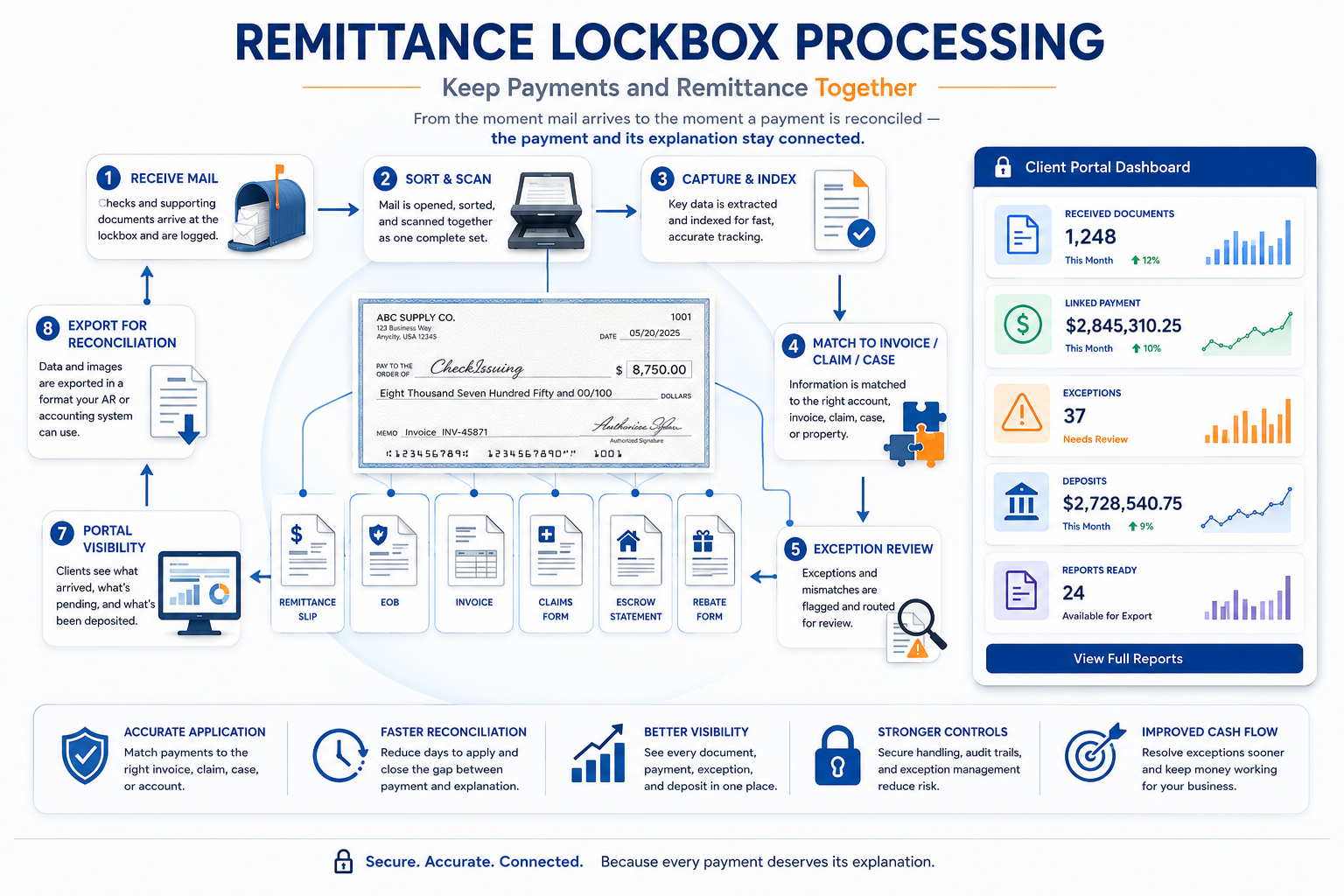
How Remittance Lockbox Processing Keeps Everything Connected
| Step | What Happens | Business Benefit |
|---|---|---|
| Receive | Payments and remittance documents arrive at a designated lockbox address. | Centralizes incoming payment mail. |
| Sort & Scan | Checks and supporting documents are opened, kept together, and scanned. | Prevents payments and remittance details from becoming separated. |
| Capture & Index | Key payment and remittance information is extracted and indexed. | Creates searchable, structured payment records. |
| Match | Payments are matched to invoices, claims, cases, properties, or accounts. | Improves posting accuracy and reconciliation. |
| Exception Review | Missing or mismatched information is identified and routed for review. | Prevents unresolved items from delaying processing. |
| Deposit Coordination | Approved payments are prepared according to the agreed workflow. | Supports consistent payment operations. |
| Portal Visibility | Clients can monitor documents, deposits, and exceptions. | Improves transparency across finance teams. |
| Export & Reconciliation | Payment data is exported into AR or accounting systems. | Streamlines cash application and reconciliation. |
A well-run remittance lockbox process is built to prevent exactly that kind of separation, from the moment mail arrives to the moment a payment is ready to post.
- Receive: Checks and their accompanying documents arrive at a designated address or lockbox, where they’re logged as soon as they come in.
- Sort and Scan: Envelopes are opened, contents are kept together, and the check and its remittance document are scanned as one linked image rather than two unrelated pieces of paper.
- Capture and Index: Key fields are pulled from what’s been scanned: payer name, check number, amount, invoice or account reference, entity or department, and any adjustment reason noted on the document.
- Match to Account, Claim, Case, or Property: Captured data is checked against the client’s own records so each item can be tied to the right entity, whether that’s an account, a case, a claim, or a property.
- Flag Exceptions: Items that don’t fit the standard pattern, like a payment with no remittance attached or a total that doesn’t match the listed invoices, are assigned a reason and routed for review rather than left to sit.
- Coordinate Deposit: Checks that clear validation are prepared and deposited on the schedule the client’s banking setup calls for.
- Portal Visibility: Clients can see what arrived, what was scanned, what’s pending review, and what’s already been deposited, all through one online view.
- Export for Posting and Reconciliation: Captured data and images are made available in a form that the client’s AR or accounting system can use, closing the loop between what was received and what gets posted.
The payoff isn’t just theoretical. One U.S. Bank healthcare client found that centralizing checks and remittance documents helped post payments four to seven days faster and automated more than 90% of postings that had previously been done by hand. That’s a single case study, not a guarantee, but it shows what’s possible once a payment and its paperwork stop traveling separately.
This is also where lockbox services earn the name. The work isn’t software quietly running in the background. It’s people opening mail, scanning documents, validating data, and coordinating deposits, with the portal there to show clients what’s happening rather than to do the work itself.
Let Us Handle Your Remittance Lockbox Processing
None of this is about eliminating exceptions. They’re a normal part of payment processing, not a flaw to be engineered away. What changes with a stronger process is whether an exception gets resolved quickly, with a clear record attached to it, or whether it just becomes another unexplained line in a deposit.
At CheckIssuing, we manage that work end-to-end, from receiving the mail to flagging exceptions for review, coordinating deposits, and keeping reports available through our client portal. It fits naturally alongside the rest of what we do, including check printing, document mailing, ACH, email checks (eChecks), rebate processing, and 1099 delivery, so remittance handling doesn’t have to sit apart from the rest of your payment operations.
If your team is still piecing together what a payment was for after it’s already hit the bank, contact us, call us, or set up a meeting with our experts to talk through how CheckIssuing’s remittance lockbox processing and portal visibility could fit into your workflow.
Citations
- Financial Executives Research Foundation (FERF) – New Research on Remittance Information Challenges -https://www.financialexecutives.org/About-FEI/For-the-Press/2025/New-FERF-Report-Finds-C-Suite-Distance-Can-Hinder.aspx
- Federal Reserve – Exchange Framework Validated for Electronic Remittance Information – https://fedpaymentsimprovement.org/news/blog/exchange-framework-validated-for-e-remittance-information/
- AFP 2025 Digital Payments Survey – https://www.jpmorgan.com/content/dam/jpmorgan/images/payments/afp-digital-payments-survey-2025/2025-afp-digital-payments-survey-report-ada.pdf
- U.S. Bank – Healthcare Lockbox Automation Case Study – https://www.usbank.com/corporate-and-commercial-banking/treasury-payment-solutions/client-stories/healthcare-payment-consolidator.html