
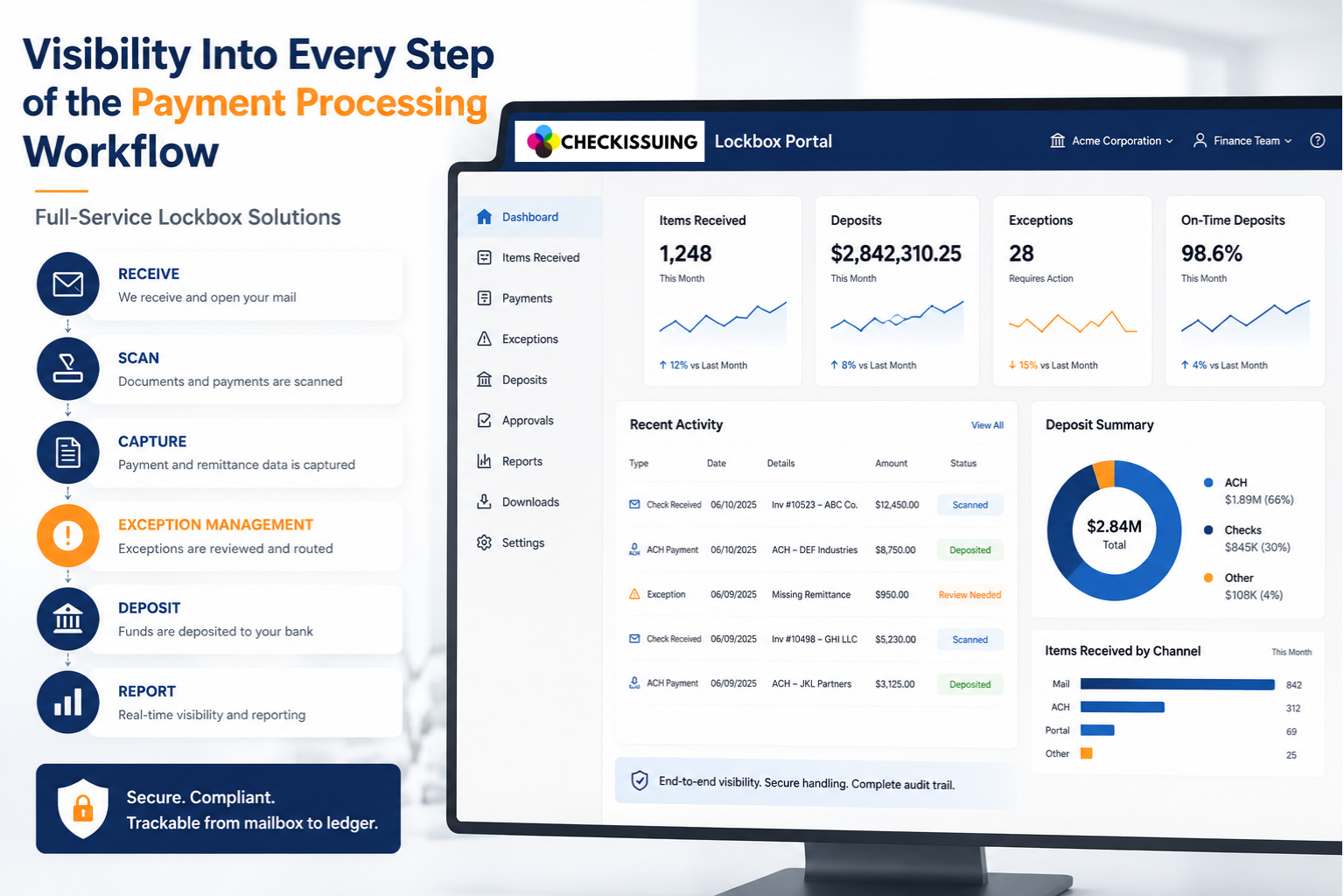
Finance teams usually learn that a payment arrived before they learn what it was for. The bank shows a deposit total, and that number matters, but it does not explain what came in, which documents supported it, what still needs review, or whether it landed against the right account.
That gap sits at the center of modern payment processing. When money moves through more channels than ever, visibility into each step stops being a convenience and becomes the difference between a workflow you can trust and one you spend your week chasing.
Quick Answer Summary
A payment processing workflow is more than moving money from one account to another. Finance teams need visibility into every step, including payment receipt, remittance documents, exception handling, deposit coordination, reconciliation, and reporting. When payments and supporting information remain connected throughout the workflow, organizations can improve accuracy, reduce manual work, strengthen financial controls, and reconcile payments more efficiently.¹²³
Key Takeaways
- Modern payment processing involves multiple payment channels—including checks, ACH, cards, digital payments, and remittance documents—that require a unified workflow.¹²
- Visibility into payment receipt, scanned documents, exception status, deposits, and reporting helps finance teams reconcile payments faster and more accurately.
- Remittance documents provide the context needed to correctly apply payments and reduce unapplied cash.
- Structured exception management helps prevent payment issues from being lost in manual email chains or spreadsheets.
- Full-service lockbox processing combines operational payment handling with portal visibility, creating a complete audit trail from mail receipt through reconciliation.
- Better workflow visibility supports stronger financial controls, reporting, fraud prevention, and collaboration across finance, AR, operations, and accounting teams.⁴
Payment Processing Has More Moving Parts Than Most Teams Realize
Money reaches a business through more paths than most workflows were designed to handle, and those paths rarely line up neatly. Checks, ACH transfers, card payments, email checks (eChecks), portals, mailed remittances, and bank files all feed the same set of books.
The scale is easy to underestimate. The Federal Reserve’s 2025 payments study counted 236.6 billion noncash payments in 2024, with cards accounting for more than three-quarters by number and ACH for close to three-quarters of the total value.
Checks keep declining, yet AFP found they still account for 26 percent of B2B payments, down from 33 percent in 2022. On the digital side, Nacha reported 35.2 billion ACH payments worth 93 trillion dollars in 2025.
None of that means one rail has won. It means the workflow is no longer a straight line, and a team that can only see the final deposit is missing most of what happened before it.
Where Visibility Breaks Down
The trouble usually starts with how the work gets done, not with the payments themselves. Manual handling still runs on mail trays, spreadsheets, shared inboxes, and scanned files sitting in someone’s folder, which means the answers to simple questions live in different places or in someone’s memory.
Those questions are the ones that stall an accounts receivable team:
- Did the payment arrive, and when?
- Was it scanned, and did the remittance come with it?
- Was it deposited, or is it still waiting on review?
When those answers are scattered, staff end up searching email, shared folders, bank portals, and the accounting system just to piece one payment back together.
The manual reality is wider than most teams admit. One American Express and PYMNTS report found that only 17 percent of businesses have fully automated their payment processes, while 35 percent of mid-sized firms still rely entirely on manual AR. When payments and their supporting paper drift apart, cash flow, reporting, and customer follow-up all slow down together.
Connecting Payments to the Documents and Exceptions Behind Them
A payment on its own rarely tells the whole story. The remittance document does, and that is why sound document workflows matter as much as the deposit itself.
Remittance detail is what lets a team apply a payment correctly. It names the payer, the invoice, the account, and often a case, property, claim, or department, which is exactly the information that keeps money from landing in an unapplied bucket. Scanned images and structured data give staff a way to confirm what arrived.
Then there are the items that do not process cleanly. Every process has them:
- Missing remittance details
- Mismatched amounts
- Duplicate checks or unclear payer information
- Items that need approval before posting
Visibility is not only seeing the payments that worked. It is seeing the ones that did not, then flagging, routing, and tracking each exception so it does not disappear into an email thread. That habit also leaves a clear record, which is exactly what regulated, healthcare, legal, and claims workflows need when someone must review the trail later.
How Visibility Strengthens Reconciliation and Controls
Reconciliation is really a matching problem. Payment reconciliation depends on lining up deposits, payment records, remittance details, and the right customer accounts, and it gets faster when that data and its documents move together instead of separately.
To close the loop between a bank deposit and an AR record, teams need deposit batch details, scanned items, payer information, exception status, and reporting they can use, ideally broken out by entity, case, claim, property, or program. Reporting that granular is what answers the “what was this payment for” question before it becomes a search.
Controls belong in the same conversation. AFP’s 2026 survey found that 76 percent of organizations faced attempted or actual payment fraud in 2025, and 58 percent reported check fraud specifically. A workflow you can see supports chain of custody and leaves clean records at each step, which matters most when checks and sensitive documents are still moving through the process.
How Full-Service Lockbox Creates a Trackable Payment Processing Workflow
This is where lockbox earns its place, less as a piece of software and more as the operational bridge between physical receivables and digital records. Full-service lockbox services handle the hands-on work so the trail stays intact from the moment mail arrives.
In practice, that work looks like this:
- Receiving and opening the mail
- Sorting and preparing documents
- Scanning items and uploading the images
- Reviewing and coding exceptions
- Coordinating deposits
- Producing the reports finance teams rely on
The portal sits on top of that, giving clients a clear view of received items, scanned images, payment details, exception status, deposit activity, approvals, downloads, and reports. It shows the work; it does not replace it. Because receivables rarely travel alone, lockbox connects naturally to the rest of what we do, from check printing and document mailing to ACH and digital checks, rebates, and 1099s.
| Workflow Stage | Purpose |
|---|---|
| Payment Received | Receive incoming checks, ACH payments, or payment-related documents through a structured intake process. |
| Document Capture | Scan and organize remittance documents, invoices, EOBs, claims, and other supporting paperwork. |
| Data Capture | Record key payment details such as payer, invoice, account, claim, property, case, or reference numbers. |
| Exception Review | Identify and route missing information, mismatched amounts, duplicate payments, or other items requiring review. |
| Deposit Coordination | Coordinate deposits according to the agreed banking setup, processing schedule, and client workflow. |
| Reconciliation | Match payments with invoices, accounts, claims, cases, or other internal records to support accurate posting. |
| Reporting | Provide visibility into payment status, deposit batches, exception activity, and audit-ready reporting. |
Seeing the Whole Workflow, Not Just the Deposit
A deposit total will always tell you that money came in. It will never tell you the rest of the story on its own, and that missing context is where accuracy, efficiency, and trust quietly leak out of a finance operation. The point of visibility is not more dashboards for their own sake. It is knowing, at any moment, what arrived, what it was for, what still needs a decision, and whether the books reflect reality.
That is the work we care about at CheckIssuing. If your team is stitching payments and documents together by hand, contact us to see how full-service lockbox processing and portal visibility can give you a workflow you can follow from the mailbox to the ledger.
If you need to improve your payment processing workflow, contact us, call us directly, or set up a meeting with our experts for a free guided demo.
Payment Processing Workflow FAQs
What is payment processing workflow visibility?
Payment processing workflow visibility is the ability to track incoming payments from receipt through scanning, remittance capture, exception review, deposit coordination, reconciliation, and reporting. It helps finance teams understand where each payment is within the process.
Why is payment visibility important for finance teams?
Visibility helps finance teams identify received payments, review supporting documents, manage exceptions, reconcile deposits, and reduce the time spent searching across spreadsheets, email threads, and multiple systems.
How do lockbox services improve payment processing?
Full-service lockbox processing helps organize incoming payment mail by receiving documents, scanning checks and remittance information, capturing key payment details, routing exceptions, coordinating deposits, and providing reporting through a client portal.
What information should finance teams be able to track during payment processing?
Depending on the workflow, teams may track received payments, scanned documents, payer information, invoice references, remittance details, exception status, deposit batches, approvals, reconciliation reports, and exportable payment data.
Can payment processing workflows support multiple departments or entities?
Yes. Full-service lockbox workflows can often be configured around multiple entities, departments, properties, claims, cases, locations, or other business-specific reporting structures.
Does CheckIssuing provide payment processing software only?
No. CheckIssuing provides full-service payment operations, including lockbox processing, document scanning, remittance capture, exception review, deposit coordination, reporting, and portal visibility. The portal allows clients to view the workflow while CheckIssuing performs the operational processing behind the scenes.
Citations
- Federal Reserve – Noncash Payments Study – https://www.federalreserve.gov/paymentsystems/frps_cy2015_24_topline.htm
- AFP Digital Payments Survey 2025 (JPMorgan) – https://www.jpmorgan.com/content/dam/jpmorgan/images/payments/afp-digital-payments-survey-2025/2025-afp-digital-payments-survey-report-ada.pdf
- Nacha – ACH Network Volume and Value Statistics – https://www.nacha.org/content/ach-network-volume-and-value-statistics
- American Express & PYMNTS – Friction to Flow AR Tracker – https://www.americanexpress.com/content/dam/amex/us/merchant/pdf/bcfm/PYMNTS-Friction-to-Flow-AR-Tracker-June-2025.pdf
- Association for Financial Professionals – Payments Fraud Survey -https://www.financialprofessionals.org/training-resources/resources/survey-research-economic-data/details/payments-fraud