
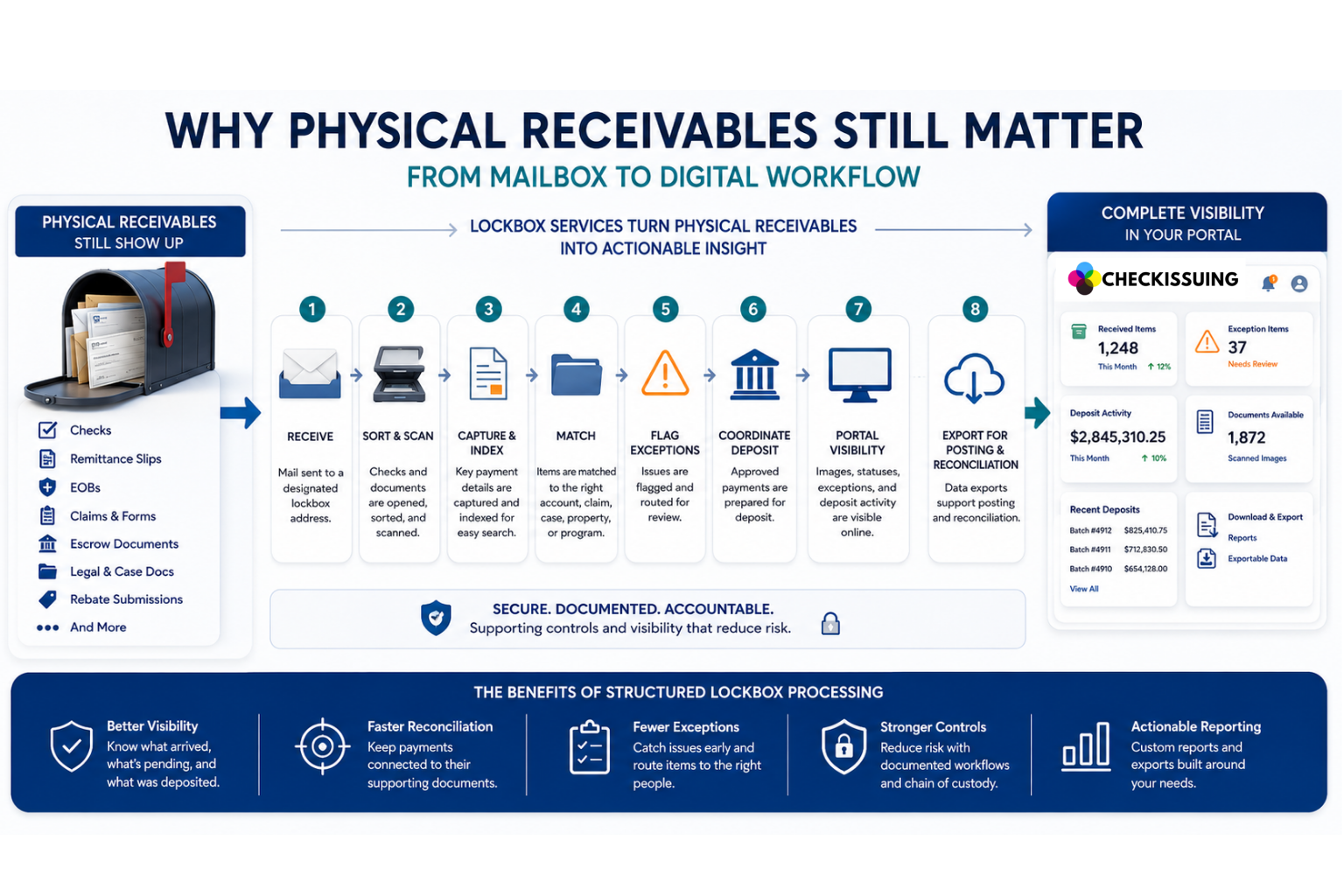
A finance team can run its books in the cloud, settle most payments through ACH, and coordinate work across three offices without ever touching a paper file, and still, almost every week, someone must open an envelope. Inside might be a check, an EOB, a claim form, or an escrow document. That envelope is part of the job, too.
Physical receivables haven’t disappeared. They’ve just become the part of the workflow that’s easiest to overlook. Understanding why they still matter, and what to do with them, is the difference between a digital operation and a complete one.
Quick Answer Summary
Although digital payments continue to grow, physical receivables remain an important part of business operations. Checks, remittance slips, EOBs, claims, escrow documents, and other payment-related paperwork still require secure intake, document capture, reconciliation, and reporting. Lockbox services help businesses transform physical payment mail into structured digital workflows, improving visibility, reducing manual handling, and supporting faster reconciliation.¹²³
Key Takeaways
- Digital payment adoption continues to increase, but many businesses still receive a significant volume of physical checks and payment-related documents.¹²
- Physical receivables often include critical supporting documents such as remittance slips, EOBs, claims, rebate forms, escrow documents, and legal paperwork that must remain connected to the payment.³
- Remote and hybrid work environments have made consistent handling of physical mail more challenging, increasing the need for structured intake workflows.⁴
- Lockbox services convert physical payment mail into searchable digital records through scanning, indexing, exception handling, deposit coordination, and portal visibility.
- Document capture, exception management, and payment reconciliation are often more valuable than deposit processing alone for organizations with complex receivables.
- Payment fraud continues to affect organizations across multiple payment channels, reinforcing the importance of controlled mail handling and documented workflows.⁵
- CheckIssuing combines lockbox processing with ACH, digital checks, check printing, document mailing, rebate processing, and 1099 services to create a connected payment operations workflow.
Digital Payments Are Growing, But Physical Receivables Haven’t Disappeared
Digital payment adoption keeps climbing, and the data backs that up. Still, growth in one channel hasn’t meant the retirement of another. It’s meant more channels running side by side.
The Federal Reserve’s 2024 Payments Insights study found that 73% of 2,000 U.S. businesses surveyed said they had used checks to make or receive payments during the previous 12 months in 2024. Check use reached 83% among small businesses, even as ACH adoption grew alongside it.
According to the 2025 AFP Digital Payments Survey, organizations reported making 26% of their B2B payments by check and receiving 25% by check, down from 81% and 75%, respectively, in 2004. Still, a quarter of B2B receivables is a meaningful operational load. Customers, payers, and vendors simply don’t modernize at the same pace, and a payment method doesn’t need to dominate the transaction mix to create real work for whoever processes it.
Why the Documents Accompanying a Payment Still Matter
A check by itself is rarely the whole story. Usually, it arrives with whatever document explains what the money is for and where it belongs:
- Remittance slip
- EOB
- Escrow statement
- Claims packet
- Rebate submission
- Case reference
| Document Type | Why It Matters |
|---|---|
| Remittance Slip | Identifies which invoices or balances the payment should be applied to. |
| Explanation of Benefits (EOB) | Explains insurance payments, claim decisions, and adjustment details. |
| Escrow Statement | Supports property, escrow, title, and transaction-related payment reconciliation. |
| Claims Packet | Provides documentation needed to process insurance, benefits, or claim-related payments. |
| Rebate Submission | Connects payments to promotional, rebate, incentive, or customer fulfillment programs. |
| Case Reference | Associates payments with legal, bankruptcy, collections, or case-specific matters. |
When that documentation gets separated from the payment, posting slows down, cash sits unapplied until someone tracks down what it was for, and customers end up fielding questions a properly indexed document would have already answered.
Medicare’s distinction between Electronic Remittance Advice and Standard Paper Remit illustrates the point well: The explanation behind a claim payment and the payment itself function as one accounting event, not two. A scanned check image without its supporting paperwork only tells half the story, and document workflows that keep a payment tied to its context are doing more work than people usually give them credit for.
Where Physical Mail Creates Gaps in Modern Accounts Receivable
Most breakdowns in physical receivables processing don’t happen at the bank. They happen earlier, in the gap between the mailbox and everything downstream of it, and the pattern tends to repeat regardless of industry.
Below are some of the habits that show up repeatedly in offices without a real intake process:
- Nobody is clearly responsible for the PO box, so items sit until someone notices them.
- One person opens the mail, while another scans it, and a third prepares the deposit, so the timeline depends on all three being available.
- Remittance data gets keyed into spreadsheets by hand because there’s no faster way to move it along.
This isn’t only a small business problem. In March 2026, 22.6% of employed people at work teleworked or worked from home for pay, a rate that had remained between 21.5% and 23% over the preceding year, and a meaningful share of the workforce simply isn’t sitting next to the mailbox.
A deposit total confirms that funds moved. It doesn’t say what arrived, what’s missing, or whether the payment is ready to post, and that gap is exactly where accounts receivable work gets harder or easier, depending on how the mail was handled in the first place.
How Lockbox Services Turn Mail Into a Digital Workflow
This is the stage where physical receivables either stay stuck as loose paperwork or become a structured part of the digital ledger, which is part of why banks and businesses still rely on lockbox processing in the first place. Walking through it step by step shows where the structure actually comes from.
- Receive: Mail goes to a designated address built for this volume, rather than a general office mailbox someone checks when they remember to.
- Sort and Scan: Checks, remittance slips, EOBs, claims, and correspondence are opened and separated, then scanned so the content exists digitally from the start.
- Capture and Index: Relevant details (amounts, references, account numbers) are captured and indexed in a way the business can actually search later, not just stored as an image.
- Match to Account, Claim, Case, or Property: Each item gets connected to the entity, claim, case, property, or program it belongs to, instead of sitting as an unlabeled file.
- Flag Exceptions: Items that don’t move straight through (mismatched amounts, missing documentation, illegible details) get flagged and routed instead of stalling quietly in someone’s inbox.
- Coordinate Deposit: Approved checks are prepared for deposit according to the agreed cadence and banking setup.
- Portal Visibility: Images, statuses, exceptions, and deposit activity become visible to the client, so “what happened to this check” has an answer that doesn’t depend on remembering who handled it.
| Step | What Happens | Business Benefit |
|---|---|---|
| 1. Receive | Payment mail is delivered to a secure lockbox address instead of a general office mailbox. | Creates a centralized intake process and reduces delays. |
| 2. Sort & Scan | Checks, remittance slips, EOBs, claims, and supporting documents are opened, sorted, and scanned. | Converts physical mail into searchable digital records. |
| 3. Capture & Index | Key payment details and document references are captured and indexed. | Makes payments easier to locate, search, and reconcile. |
| 4. Match | Payments are matched to invoices, claims, properties, cases, accounts, or programs. | Improves posting accuracy and reduces manual research. |
| 5. Exception Review | Missing information, mismatched amounts, or unclear documents are flagged for review. | Prevents processing delays and keeps exceptions visible. |
| 6. Deposit Coordination | Approved payments are coordinated for deposit according to the agreed workflow. | Supports consistent cash application and reporting. |
| 7. Portal Visibility | Clients can view scanned images, payment status, deposits, and exceptions. | Provides transparency without relying on manual updates. |
| 8. Export & Reconciliation | Payment data is exported for posting and reconciliation. | Streamlines month-end close and accounts receivable workflows. |
Export for Posting and Reconciliation
Captured data can be exported to support posting and reconciliation, keeping the bank deposit and the AR ledger tied to the same reference information.
None of this happens because software is quietly watching a mailbox. It happens because people are opening, sorting, scanning, reviewing, and routing, and the portal is where that work becomes visible rather than a replacement for it.
The structure matters because physical receivables also carry real exposure. The 2026 AFP Payments Fraud and Control Survey revealed that 76% of organizations experienced attempted or actual payments fraud in 2025, with 58% reporting check fraud, which supports fewer unnecessary handoffs and a documented chain of custody, even though no process can promise fraud will never happen.
Connecting Physical Intake With the Rest of the Payment Operation
Physical mail still matters. Managing it manually is the part that doesn’t have to be.
Digital payments offer real advantages in speed and security, and that trend isn’t reversing. The more useful goal is making sure whatever physical receivables your business still receives, and most businesses receive some, get handled with the same rigor as anything moving through ACH or card processing.
At CheckIssuing, we receive and sort inbound mail, scan checks and the documents that come with them, capture and index the relevant data, flag exceptions for review, coordinate deposits, and make all of it visible through your portal. Lockbox services don’t have to stand alone either. They pair naturally with our check printing, digital checks or email checks (eChecks), ACH, document mailing, rebate processing, and 1099 services, so the payment processing side of your operation runs through one connected partner instead of several disconnected vendors.
If you’re trying to figure out what to do with the mail that still shows up every week, contact us, call us, or set up a meeting with the team, and we’ll talk through your volume, document types, and reporting needs together.
Citations
- Federal Reserve Financial Services — Business Payments Study (2024)
https://fedpaymentsimprovement.org/wp-content/uploads/2024-federal-reserve-payments-insights-business-study.pdf - Association for Financial Professionals (AFP) — 2025 Digital Payments Survey
https://www.jpmorgan.com/content/dam/jpmorgan/images/payments/afp-digital-payments-survey-2025/2025-afp-digital-payments-survey-report-ada.pdf - Centers for Medicare & Medicaid Services (CMS) — Electronic Remittance Advice (ERA)
https://www.cms.gov/medicare/coding-billing/electronic-billing/health-care-payment-remittance-advice - U.S. Bureau of Labor Statistics — Telework Statistics (March 2026)
https://www.bls.gov/opub/ted/2026/22-6-percent-of-workers-teleworked-in-march-2026.htm - Association for Financial Professionals (AFP) — 2026 Payments Fraud and Control Survey (Key Highlights)
https://www.truist.com/content/dam/truist-bank/us/en/documents/info/cci/2026-afp-payments-fraud-control-survey-report-key-highlights.pdf